
On this page
If you manage Instagram for an agency, you already know the moment. A branded collab post with an influencer or partner brand outperforms almost everything else that month, and it's nowhere in your reporting tool. You pull up Meta Business Suite instead, screenshot the numbers, and paste them into a slide by hand. Every month, for every client running a partnership.
That ritual usually eats 30 to 60 minutes per report, and it scales badly. Ten client accounts running influencer campaigns means ten separate trips into Meta Business Suite, ten sets of screenshots, ten chances to miss a post or transpose a number before the deck goes out.
We checked six platforms to find out which ones actually surface collaborator post data, and what you lose if yours doesn't.
Why collab posts vanish from your analytics tool
This isn't a bug in your scheduler. It's how Instagram's API works.
When two accounts co-author a post, an influencer and a brand, or an agency client and a partner, Instagram only attributes that post to one "owner" account. Every third-party tool, including the one you're using now, pulls performance data through Meta's API using that ownership model. If your connected account is the collaborator rather than the owner, the post simply isn't part of your account's data set at the API level. Most tools don't show it, flag it, or explain why it's missing. It just isn't there, and there's nothing in the interface to tell you that's what happened.
For agencies, that's a real problem, not a cosmetic one. Branded content and influencer partnerships are often the highest-performing posts in a campaign. They're also the posts a client is most likely to ask about by name in a review call, which means the gap shows up exactly when it's most visible.
What to look for in a tool that handles this properly
Before comparing tools, here's what actually matters for this specific gap. It's a shorter list than most comparison articles use, because most of the usual criteria (calendar view, bulk scheduling, approval flows) aren't where tools differ on this problem.
- Does it show collaborator posts at all, or does it silently drop them the way most tools do? A tool can have excellent analytics for owned content and still have nothing here.
- Can that data go into a client report without a manual export from Meta Business Suite first? If the answer is no, the tool hasn't actually closed the gap, it's just moved where you do the copy-paste.
- Does it support campaign-level organization (tags, labels) across owned and collaborator posts, so reporting doesn't need two separate systems for two kinds of content?
- What does the plan actually cost once you add the users and accounts a 10 to 50 person agency needs, not the entry-tier price advertised on the homepage?
With those four questions in mind, here's how six tools stack up.
The tools, compared
Hootsuite. Entry price around $99 per user a month, scaling per seat as your team grows. Broad platform with solid core scheduling, and analytics sits behind its higher tiers rather than the base plan. It's a reasonable choice if your reporting needs are mostly about owned content and managing volume across many channels. Like every tool on this list, it pulls performance data through the same Meta API and has no dedicated way to surface collaborator posts, so the gap shows up here too, just inside a more expensive plan.
Sprout Social. Entry price around $79 per user a month. Strong social listening and a genuinely well-built reporting suite for owned content, which makes the collaborator post gap more noticeable by contrast rather than less. The underlying limitation is the same: collaborator posts fall outside what the API attributes to your account, so no amount of Sprout's reporting depth changes what data it has access to.
Buffer. Entry price around $5 per channel a month, which sounds cheap in isolation until you're managing a full agency roster and the cost scales with every channel you add across every client. Analytics is lighter than the enterprise-tier tools generally, and Buffer inherits the same collaborator post gap as the rest of this list.
Later. Entry price around $25 per brand a month. Built primarily for visual content planning and calendar-first scheduling, with analytics positioned as a secondary feature rather than the core product. Same story on collaborator posts: not surfaced, and no indication in the product that they're missing.
Metricool. Entry price around $20 per brand a month, and worth calling out specifically. Metricool's analytics coverage is genuinely the fullest of the group we checked, closer to a dedicated reporting tool than a scheduler with analytics bolted on. It still doesn't document any handling for collaborator posts specifically, so the same Meta API limitation applies underneath all that reporting depth. If general analytics were the only question on this list, Metricool would be the strongest answer here. It isn't the only question, and for agencies running partnership campaigns, it's the one that matters most.
Sked Social. Custom pricing built for agency accounts rather than a flat self-serve tier. Sked Social added a dedicated Collaborator Posts section to Insights, kept fully separate from owned post metrics so nothing gets blended into your account totals or inflates numbers that should stay clean. Collaborator posts get the same detailed metrics card and modal as owned content, plus a Top 5 Collaborator Posts widget built specifically for Custom Reports, and they carry Campaign Labels the same way owned posts do, so they slot into existing reporting structure instead of needing a workaround. It's included for every plan with an Instagram account connected. No add-on, no separate tier, no extra cost to see the data that was already yours.
Comparison at a glance
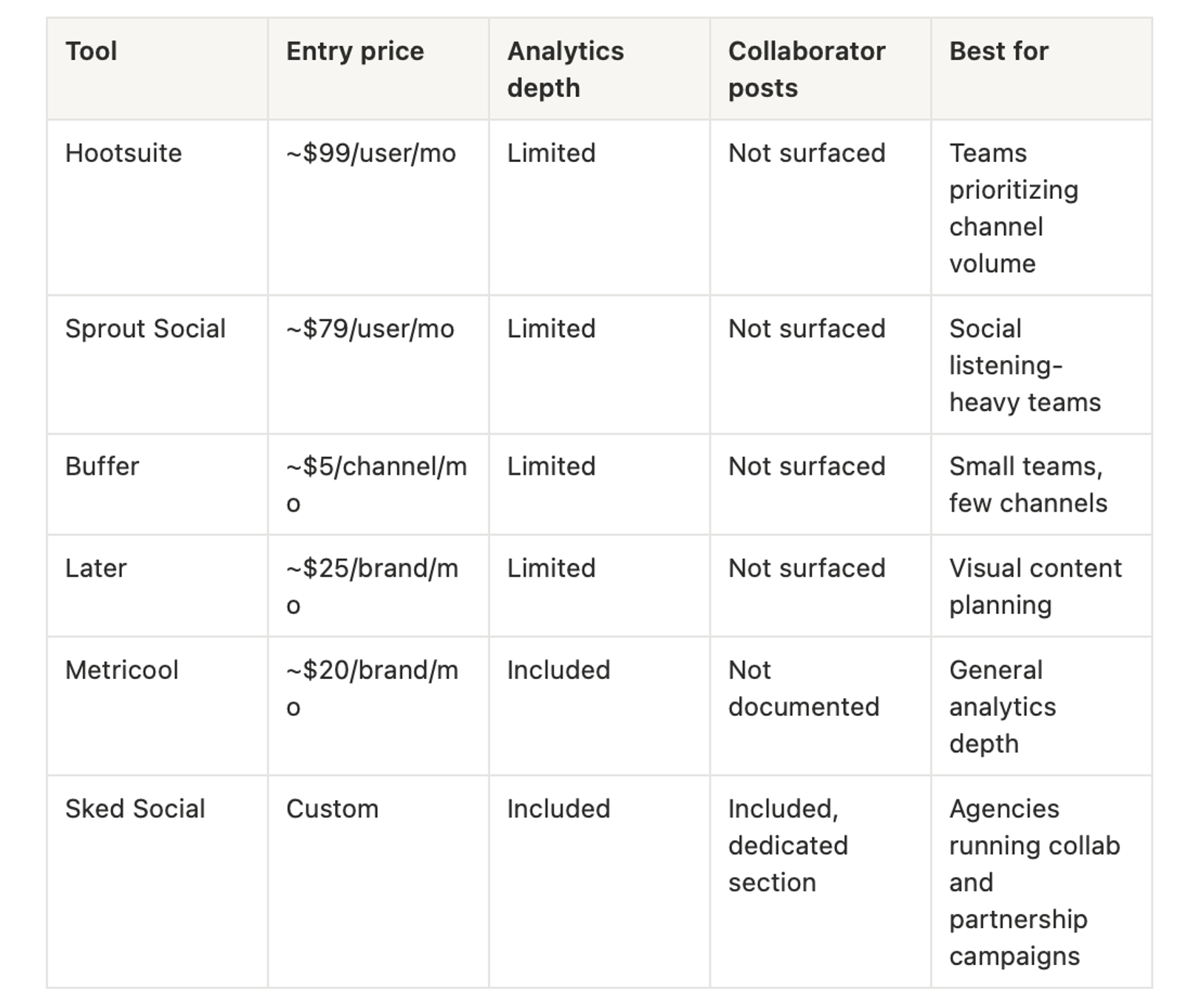
Our recommendation
Metricool has real analytics depth if collaborator posts genuinely aren't part of your reporting problem this month. It's a fair pick on general reporting strength alone. For agencies where collaborator content is a regular part of the strategy, none of the other five tools actually solve the gap, because it sits in the API model they're all built on top of, not in how good their dashboards look.
Sked Social was built to close that specific gap rather than work around it. Collaborator posts show up in Insights with the same level of detail as owned content, feed into Custom Reports through a dedicated widget so nothing needs a manual export, and carry Campaign Labels the same way owned posts do, so a client report doesn't need two separate systems to cover both kinds of content. That's the one or two dimensions we'd point to, not a claim that Sked Social wins on everything on this list.
One agency cut its social media software costs by 40% after switching to Sked Social. Sked Social holds a 4.6 rating on G2, and more than 10,000 marketers currently manage their social accounts through it.
If influencer content or brand partnerships are a regular part of your Instagram strategy, that monthly export-and-paste ritual has an end point. It doesn't need to happen every month for every client for as long as you run the account.
See our pricing, or talk to sales about moving your team over.