A client’s Reel is outperforming everything else on their account this month, and they message asking if you can put some budget behind it. So you open Meta Ads Manager in a new tab, find the right ad account among the dozen you have access to, and rebuild the audience you used last time from memory. Then you hunt down the post, set a budget, submit, and head back to your scheduler hoping you picked the right account.
Boosting a post isn’t hard. What wears you down is doing it in a different tool from where the post lives, for every client, every time one takes off.
Boost what’s working, not what you hope will work
The posts most worth boosting are usually the ones that have already proven themselves. A Reel that’s pulling unusual engagement in its first day, a carousel getting saved and shared, a post that’s driving comments well beyond your average. These are the posts your audience has already voted for, and putting budget behind them is a much safer bet than boosting something before anyone has seen it.
That’s why the moment matters. Posts tend to show their potential early, and the gap between “this is doing well” and “this is boosted” is time the post spends cooling off. The faster you can act on a strong post, the more the boost builds on momentum that’s already there.
Why boost from your scheduler at all
Your scheduler is where the post was planned, approved, and published, so it already knows the account, the caption, and the date it went live. Boosting from the same place means you aren’t re-finding any of that when you’re trying to move quickly.
There’s also the risk side. When you manage ad accounts for several clients, a second tool is a second chance to boost one client’s post on another client’s card. Keeping boosting next to publishing cuts down the places where that can go wrong.
What to look for in a scheduler that can boost
Eligibility checks before you start. Meta has rules about which posts can be boosted. A good tool checks the post and the connected ad account up front, before you’ve spent five minutes on audience and budget.
Clear feedback when something fails. Boosts do get rejected, and you want to know right away and why. When you’re trialing a tool, ask what happens when a boost doesn’t go through and where you’ll see it.
Control over who can spend, and on which account. For agencies, this matters more than anything else on the list. You want each client’s boosts to run from that client’s ad account, and only the right people on your team able to spend from it.
Control over audience, budget, and duration. Some tools give you a one-click boost with fixed settings. That’s fine for a quick push, but when a client has a specific audience in mind you’ll want to set it yourself.
Settings saved against the post. When a client asks what you spent on last month’s launch post and who you targeted, the answer should be attached to the post itself.
Paid results next to organic. If you have to go back to Ads Manager to see how the boost performed, you’ve only moved half the job into your scheduler.
Availability on your plan. Boosting isn’t always included on every tier, so check which plan you’d need before you fall for a feature.
Which social media schedulers let you boost posts
Plenty of schedulers now include boosting, and they handle it differently. Features checked October 2026.
- Sprout Social: Sprout offers boosting for both published and unpublished (dark) posts on Facebook and Instagram. You can boost drafted, scheduled, and queued posts, and only users with publishing permissions for the selected pages and the associated ad account can access paid promotion.
- Hootsuite: Hootsuite supports boosting on Facebook, Instagram, and LinkedIn, with the option of boosting single posts or setting up auto-boosting based on criteria you set. How much you can spend per month on boosts depends on your Hootsuite account type. hootsuitehootsuite
- Agorapulse: Agorapulse supports Facebook post boosting, but once a post has been boosted through Agorapulse it can’t be boosted again there, and availability depends on your subscription plan.
- Loomly: Loomly lets you boost Facebook, Instagram, and LinkedIn posts from its Post Builder, where you set the budget, timeframe, and target audience.
- Metricool: Metricool can boost Facebook and Instagram posts, but its boosts run for two days on default settings that can’t be edited, so customizing duration, budget, and audience means creating a separate ad.
So the useful question is less “can this tool boost?” and more “how well does it handle the list above?” That’s especially true when the budgets you’re spending belong to your clients.
How to boost a post in Sked Social
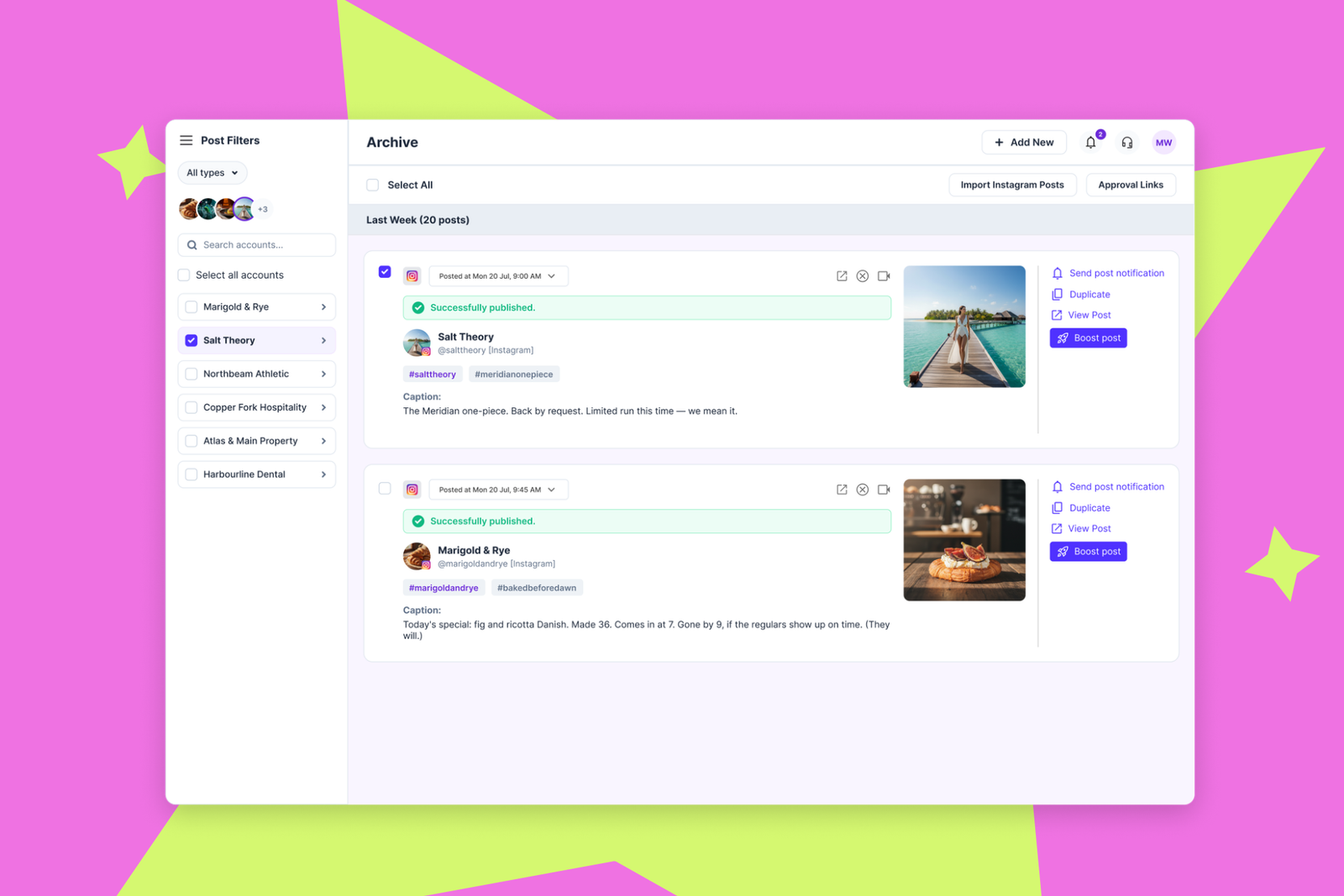
Sked Social lets you boost published Facebook and Instagram posts straight from the Archive, on every plan. Because boosting starts from the Archive, it fits the approach above: you boost a post once you can see it’s earning it.
Set up once, per client. An admin links a Meta Ads account to each client group in Group Settings, then grants the Can Boost Posts permission in Team settings to the people who should be able to boost. Every boost for that client runs from that client’s account, only the people you’ve chosen can start one, and nobody needs a Meta Business Manager invite to do it. If your connected Meta account is missing the ads permission, Sked Social prompts you to reconnect. That takes about a minute and doesn’t change any other settings.
Boost in four steps. You don’t need to be an ads specialist. Find the post in the Archive, select Boost, and Sked Social walks you through the rest.
- Eligibility and ad account. Sked Social checks that the post can be boosted and confirms which Meta Ads account it will run from.
- Audience and objective. Choose who you want to reach and what you want the boost to do.
- Budget and duration. Set how much to spend and how long the boost runs.
- Review and boost. Check everything in one place and submit.
Feedback is immediate and inline, so if something needs fixing you’ll see it before you leave the flow. Your boost settings are saved against the post for future reference.
Spot it, boost it, see how it did, go again
Boosting is only half the job if the results live somewhere else. In Sked Social, boosted posts carry a Boosted badge in your insights, and their results show up in Paid Social and in each account’s insights, right beside your organic performance. The Archive links straight through to them too.
Open the Post Performance view on any boosted post to see how the boost did. If it’s still worth backing, select Boost again to rerun it with your previous settings already filled in. Spotting the post, boosting it, checking the result, and going again all happen in the same place, so acting on a strong post takes minutes instead of a trip to another tool.
Frequently asked questions
Can you boost Instagram posts without using Meta Ads Manager?Yes. You can boost from the Instagram app itself, or from a social media scheduler that includes boosting. If you boost from a scheduler, you’ll still need a Meta Ads account connected for billing.
Can you boost a post before it’s published?Some schedulers let you attach a boost while scheduling. In Sked Social, boosting is for posts that are already published, which lets you base the decision on how the post is actually performing.
Do I need paid ads experience to boost a post?No. A boost is simpler than building a full ad from scratch. You choose the audience, budget, and duration, and a guided flow handles the rest.
See how it works for franchises and agencies
If you’re boosting posts for five to 20 client accounts and want to see it set up with your own groups and ad accounts, book a demo. We’ll walk you through the permissions, the four steps, and the insights view, so you can see what going from published to promoted, without leaving Sked Social, looks like for your team.