On this page
- Key takeaways
- Why Claude needs more than an Instagram login
- Set it up once: connect Instagram, then Claude
- Monday: plan the week and find the gaps
- Tuesday: answer "what worked?" with real numbers
- Wednesday: turn a brief into an on-brand draft
- Thursday: clear the review queue
- Friday: work the Inbox, then turn questions into Ideas
- What Claude can't do, and who stays in charge
- Bring your own agent to Sked Social
Key takeaways
- Claude works through your Sked Social workspace, so it never needs your Instagram password. It sees the accounts, calendar, Brand Kit, and Inbox your team already uses.
- You connect it once: one custom connector in Claude, one Sked Social sign-in, no code.
- In a normal week, Claude can review the calendar, report on Instagram results, draft on-brand posts, move approvals along, and draft Inbox replies.
- A person signs off on everything that goes public. Drafts are previewed before saving, and Claude never sends a reply.
- Core tools (reading the Brand Kit and working with Ideas) come with Grow, Accelerate, and Custom. The calendar, scheduling, approvals, Inbox, and insights, including the Brand Summary, need Full access and an agent seat.
It's Monday. Your client wants to know which Instagram posts worked last month and what's going out this week. You already have Claude open in another tab. This post follows one week with Claude connected to Instagram through Sked Social.
Why Claude needs more than an Instagram login
There are plenty of ways to get Instagram data into Claude. Most stop at the numbers. Claude tells you a Reel did well. Then you copy the insight into a doc, open your scheduler, find the image, write the caption, send it for approval, and chase the approval. Claude answered in seconds, and the admin work around it still took the morning.
A few tools go further and let Claude post straight to Instagram. That works for a solo creator. For a team, it creates a post nobody can account for. No one can say who approved it, whether it matched the client's tone, or why it's on the feed.
Social teams need an agent that works where the team works. That's the idea behind Sked Social MCP.
You connect Claude to your Sked Social workspace once. Your Instagram Business accounts are already in there, along with your calendar, Brand Kit, approval statuses, media Library, and Inbox. Claude works with all of it on your behalf, and keeps a record of everything it touched.
The rest of this post walks through a normal week for a small agency. The client is a made-up neighborhood bakery called Marigold & Rye. Swap in your own accounts and the prompts work the same way.
MCP stands for Model Context Protocol, the open standard Claude uses to connect to other tools. You'll only see the term during setup.
Set it up once: connect Instagram, then Claude
There are two connections to make, in this order.
First, Instagram to Sked Social. Sked Social connects to Instagram Business accounts linked to a Facebook Page. You sign in through Meta's Facebook Login for Business and approve the permissions there, so Sked Social never sees your Instagram password. Personal accounts aren't supported. The Instagram connection guide walks through it.
Put each account in the right Brand Group. Brand Groups separate clients and locations, and Claude uses the Brand Group name to find the account you mean.
Fill in your Brand Kit while you're there: tone of voice, words to avoid, content pillars, and custom instructions. Claude reads it whenever you ask, so brand guidelines stop living in chat history.
Then, Claude to Sked Social.
- In Claude, open Customize, then Connectors.
- Click + Add, then Add custom connector.
- Name it Sked Social and enter
https://app-mcp.skedsocial.com/mcp. - Sign in with your Sked Social account and approve access.
- Open a new chat and ask, "What's on the Instagram calendar for Marigold & Rye this week?"
On Claude Team or Enterprise, an owner adds the connector under Organization settings, then Connectors. Each person then connects their own Sked Social account, and their actions are recorded under their own name. The Claude setup guide has screenshots, and Anthropic's custom connectors guide covers the Claude side.
Which access do you need? Core is included on Grow, Accelerate, and Custom, and covers reading the Brand Kit and working with Ideas. Everything else this week needs the Full access add-on and an agent seat for each person who connects. That covers the calendar, drafts and scheduling, approvals, Inbox, insights (including the Brand Summary), and the media Library. See pricing for current plans.
Monday: plan the week and find the gaps
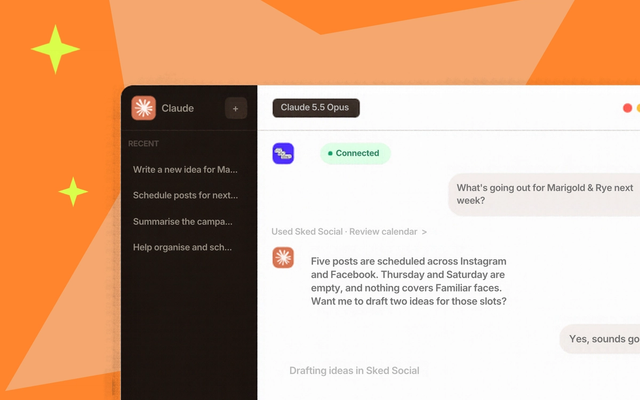
Review this week's Instagram calendar for Marigold & Rye. Which days have nothing scheduled? Which content pillars haven't had a post this month? Suggest two Ideas for the empty days and add them to the Idea Planner.
Claude reviews scheduled posts, drafts, dated Ideas, and calendar notes together. It might report five posts scheduled across Instagram and Facebook. Thursday and Saturday are empty, and nothing has gone out yet for the "Familiar faces" pillar.
Then it adds the two Ideas to the Idea Planner, where your team will see them. Each one sits in the right Brand Group, tagged to a content pillar.
Then ask when to post on the empty days.
When is Marigold & Rye's Instagram audience most active? Suggest a time on Thursday and on Saturday.
Sked Social keeps a weekly audience activity profile for each Instagram account. The suggestion comes from the bakery's own followers rather than a generic "best time to post" chart.
Add a calendar note too, like "Saturday: farmers market stall, confirm with client." Claude can add and update notes on the days you name. The context then sits on the calendar where the team can see it.
Once you have a Monday prompt you like, save it as a routine in your agent. The calendar review is then ready before the week starts.
Tuesday: answer "what worked?" with real numbers
The client call is Tuesday, and "engagement was good" won't get you through it.
For Marigold & Rye's Instagram, compare last month's reach and interactions with the month before. List the top three posts by saves, with reach, saves, and format for each. What did those posts have in common?
Claude reads account and post insights straight from Sked Social, so the numbers and the pattern arrive in one answer. Say the most-saved post was a carousel on storing sourdough, and two of the top three were how-tos. That's next week's brief.
Compare Reels and carousels for the same period. Which format drove more saves per post? Group the results by content pillar.
Sked Social tracks posts by format and by label, so Claude can break results down the way your client thinks about their content. Ask for the figures behind each comparison and check them before they go in a client deck.
For the headline only, ask for the Brand Summary. It gives key metrics, the change since last period, and the split by platform.
Wednesday: turn a brief into an on-brand draft
Wednesday is drafting day. Tuesday's numbers gave you the topic: another storage how-to, this time for croissants, to fill the empty Thursday slot.
Read the Brand Kit for Marigold & Rye. Write an Instagram caption for a carousel on keeping croissants fresh, using the notes below. Find croissant-storage-cover.jpg in the November collection and preview a draft for @marigoldandrye. Ask before saving. Flag any claim you can't check from the notes.
First, Claude reads your Brand Kit, so the caption starts from the client's voice. If Marigold & Rye never says "artisanal", the caption shouldn't either.
The image comes from your Sked Social Library. Claude searches it by file name, description, and tags. It can't upload new files or generate images, so the asset has to be there already.
The draft shows as "Not saved yet" until you approve it. Check the account, the image, and the caption, then tell Claude to save it.
For a caption someone wrote in a hurry, run the brand voice check instead.
Check this caption against Marigold & Rye's tone of voice and words to avoid. Flag anything off. Give me one revised version and keep the prices and dates as written.
Claude checks the caption against the rules your team saved in the Brand Kit. That matters most for an agency with 10 clients who all sound different.
Thursday: clear the review queue
Approvals are where Instagram posts stall. The client left a comment on Tuesday, nobody updated the copy, and the post was meant to go out today.
What Instagram posts for Marigold & Rye are waiting on review? For any with change requests, apply the changes, move the post back to review, and @mention the account manager on the post.
Claude can read post statuses, comments, and annotations. It can update captions and first comments, change approval statuses, and resolve annotations once they're handled. It leaves a comment on each post so the team can see what changed.
When the client approves the croissant carousel, put it in Thursday's open slot.
Schedule the approved croissant carousel for the Thursday time you suggested on Monday. Show me the post and the time first, and wait for confirmation.
Claude schedules the existing draft for a future time. When that time arrives, the Sked Social Instagram scheduler publishes it to the feed. If the client moves the launch, Claude can change the time on a scheduled post. Pulling a post completely happens in Sked Social.
Your approval steps don't change. Claude doesn't skip them, and it changes a status only when you ask. Each move it makes shows in the post's activity as "[Your name]'s Agent".
Friday: work the Inbox, then turn questions into Ideas
By Friday the comments have piled up. Some are lovely. Some are the same question asked 15 times.
Read open Instagram comments for @marigoldandrye from the past week. Group the repeated questions. Draft replies to the top three using our saved reply templates. Assign anything negative to me and close threads that don't need a reply. Show me the drafts before saving.
Claude can filter conversations by sentiment, status, and assignee. It can assign, tag, close, and hide conversations, add internal notes, and save draft replies. It can't send. Your team reads the drafts and sends them from the Sked Social Inbox, since replies in a customer's comments carry your name.
Those 15 people asking whether the sourdough freezes well just told you what to post next.
Turn the three most common questions into Ideas for Marigold & Rye, in the "How we bake" pillar, with a one-line angle for each.
Next Monday's calendar review picks those Ideas up.
What Claude can't do, and who stays in charge
Use Claude for the parts of your week that don't need you.
Claude can't:
- publish immediately, because scheduling needs a future time and Sked Social does the publishing
- send a reply, because Inbox replies are always drafts
- unschedule a post, which you do in Sked Social
- upload or generate media, so it works with what's already in your Library
- edit your tone of voice, which it reads but your team owns
What keeps a person in charge:
- Previews. Drafts, edits, and status changes show as "Not saved yet" until you approve them.
- Names on changes. Each person connects their own agent, and their changes are logged as "[Your name]'s Agent".
- Admin controls. On Claude Team and Enterprise, admins can switch individual Sked Social tools on or off for the organization.
Name the Brand Group and handle in every prompt so Claude acts on the account you mean.
Common questions
Questions social teams ask about Claude and Instagram
Can Claude run my Instagram account?
No. Connected to Sked Social, Claude can plan, report, draft, move approvals along, schedule approved posts, and draft replies. A person approves the content and sends the replies.
Can Claude post to Instagram for me?
Claude can schedule an existing draft in Sked Social for a future time. Sked Social then publishes it to Instagram. Claude can't publish instantly or bypass your approvals.
What kind of Instagram account do I need?
An Instagram Business account linked to a Facebook Page, connected to Sked Social through Facebook Login for Business. Personal accounts aren't supported.
Can Claude read Instagram DMs?
Claude can read the Inbox conversations your Sked Social access already allows, which can include DMs. It saves replies as drafts only, and your team sends them.
Do I need to pay extra?
Core tools are included on Grow, Accelerate, and Custom. The calendar, scheduling, approvals, Inbox, and insights need the Full access add-on and an agent seat per connected person. Pricing has the current details.
Can I use ready-made prompts?
Yes. Sked Social publishes skills for Claude, including a calendar review and a brand voice check, so your team runs the same steps every time.
Does this work for agencies with lots of clients?
Yes. Brand Groups keep each client separate, the Brand Kit keeps each voice separate, and the activity log shows exactly what changed. More on Sked Social for agencies.
Bring your own agent to Sked Social
Most of an Instagram week goes to the calendar, the report, the unanswered approval, and the same comment question again. Claude can take a lot of that on, as long as it works where your team already runs social.
Sked Social keeps your Instagram accounts, Brand Kit, calendar, approval history, and Inbox in one workspace. Claude works inside it, with your name on every change. You keep the creative and client calls.
Plan. Draft. Schedule.
Existing Sked Social customers can follow the Claude setup guide. Start your 14-day free trial if you're new. No card needed.