On this page
- Key Takeaways
- What a social media approval workflow is, and who belongs in it
- Decide what clients approve, and when
- How to get client sign-off on social media posts, step by step
- Where AI fits in social media approvals
- What to look for in a client approval tool
- Common client approval mistakes, and how to fix them
- Transform your social media management with Sked Social
Key Takeaways
- Client sign-off works when four things are fixed before the first post goes out: one decision-maker, one review link, one deadline, and one place where feedback lives.
- Do internal review first. Clients should only ever see posts your team already stands behind, batched into one review round, not dripped out one at a time.
- AI speeds up drafting, but it doesn't replace sign-off. In the Content Marketing Institute's 2026 research, 87% of marketers using AI for content creation said productivity improved, while only 39% said content performance improved.
- Ask reviewers to check facts, offers, legal disclosures, and brand fit. Taste comes last, and it should arrive as a specific change request, not "make it pop."
- On the Accelerate and Custom plans, Sked Social's approvals give clients a branded, no-login review link with automatic reminders, plus an Approvals Board that shows every post by status.
A social media approval workflow is the set path every post takes from draft to published: who reviews it, in what order, against what checklist, and by when. For client sign-off, the version that holds up is short. One decision-maker, one review link, one deadline, and an audit trail of who approved what.
Here's how to build it, step by step, whether your "client" is an agency client, a head office, or the CEO down the hall.
What a social media approval workflow is, and who belongs in it
An approval process exists for one reason: to stop the wrong post going live. A typo in a price, last month's offer, a tagged account that's since rebranded, a photo nobody had permission to use. Every one of those is preventable with a second set of eyes at the right moment.
The trouble starts when nobody has decided whose eyes, or which moment. Picture it. It's Friday afternoon, a time-sensitive campaign needs sign-off before the weekend, and the copy is done. Then the account manager wants a tweak, the creative director wants a different image, and the client wants to see it again after both changes. By Monday the moment has passed.
So start with roles. Most approval chains include some version of these five:
- Creator. The social media manager or content creator who drafts the post, sources the visuals, and submits it for review.
- Internal reviewer. An editor, account lead, or senior social manager who checks brand fit, grammar, and strategy before anyone outside the team sees it.
- Specialist reviewer. Legal, compliance, or a subject matter expert. Only for content that needs it, like pricing claims, competitions, health or financial statements, and paid partnerships.
- Final approver. The person whose yes means the post can publish. For an agency, that's the client. For an in-house team, it might be a marketing director or a brand lead.
- Publisher. Whoever schedules the approved post and confirms it went out.
Small teams often have one person wearing three of these hats. That's fine. What matters is that each role has a name next to it, and that the final approver is one person, not a committee.
The stakeholders change by team type. Agencies route content to a client contact. In-house teams route it to leadership, legal, or a brand team. Multi-location brands route it between head office and the people running each location. The structure stays the same either way: draft, review internally, get the decision-maker's sign-off, publish.
Write the chain down, share it with everyone in it, and keep it somewhere your team already works. In Sked Social, collaboration features like internal comments and notes keep the conversation attached to the post, so feedback isn't split between the tool, email, and a group chat.
Decide what clients approve, and when
Not every post needs the same level of review. A client who signs off on every Story will either burn out or stop reading closely, and both are worse than no review at all. Match the review to the risk.
A simple three-tier split works for most teams:
- Routine posts. Evergreen content, reshares, and posts built from an already-approved template or campaign. Internal review only, or a light client check in a weekly batch.
- Campaign posts. Launches, offers, events, and anything with a date, price, or promise in it. Full client sign-off, with the facts checked line by line.
- Sensitive posts. Legal claims, regulated topics, partnerships that need disclosure, crisis responses, and anything touching a news event. Specialist review first, then the final approver.
Agree the tiers with your client or stakeholder at the start of the relationship, not mid-campaign. Put examples next to each tier so nobody has to guess where a post belongs.
Then decide when the review happens. There's no single right moment. It depends on the stakeholder, the content, and how much trust is already in the relationship.
- Calendar or concept stage. Some clients want to approve the plan before anything gets made: the topics, the angles, the rough captions. This saves the most rework on campaign content, because a concept rejected on Monday costs minutes, not a designer's afternoon. In Sked Social's Idea Planner, ideas move through statuses you set, such as "In Review", so the concept round happens before a post is ever created.
- Finished-post stage. Other clients only want to see the final post, exactly as it will appear, right before it's scheduled. This suits routine content and clients who trust the plan but care about the details.
- Both. High-stakes campaigns and regulated industries usually need a concept check and a final check. Evergreen content rarely does.
If you're unsure where a client sits, look at their past behavior. A client who rewrites captions needs an earlier touchpoint. A client who only ever catches price errors needs a sharper fact checklist at the final stage, not more rounds.
How to get client sign-off on social media posts, step by step
This is the core of the process. Eight steps, from kickoff to the published post.
- Agree the rules at kickoff. Before the first review round, confirm four things in writing: who the final approver is, how long they have to review, what happens if the deadline passes, and how many revision rounds are included. "We'll hold the post until we hear back" and "we'll publish as scheduled unless you flag a change" are both valid answers. Not having an answer isn't.
- Review internally first. Clients should only see posts your team already stands behind. Check spelling, links, tags, image crops, and brand fit before anything leaves the building. Every error a client catches costs you a little trust.
- Batch posts into one review round. Send a week or two of content at once, on the same day each cycle. One round with 12 posts gets more attention than 12 separate pings.
- Send one link with a clear ask. Show posts as they'll appear on each platform, not as a caption pasted into an email. Include the deadline and what you need the reviewer to check (see the template below).
- Keep feedback on the post. Comments should sit next to the content they refer to, not in a reply-all thread. If a client sends feedback by phone or text, log it against the post before you act on it.
- Revise once, then resubmit only what changed. Fix every requested change in one pass. Send back the edited posts only, so the reviewer isn't rereading content they already approved.
- Lock it and schedule it. Once a post is approved, schedule it straight away. Any later edit, even a small one, goes back through approval.
- Keep the record. Who approved what, and when, should be visible later. That record settles the "did we sign off on this?" question in seconds.
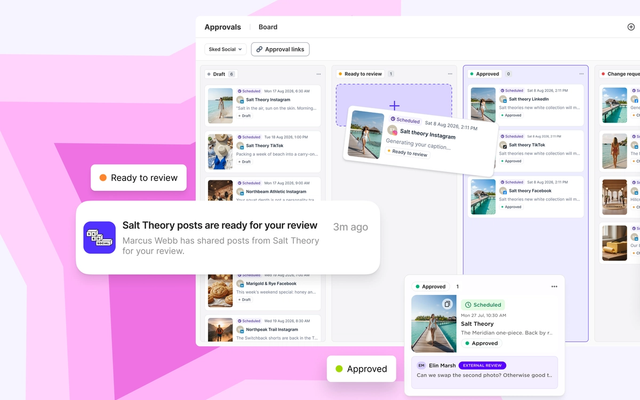
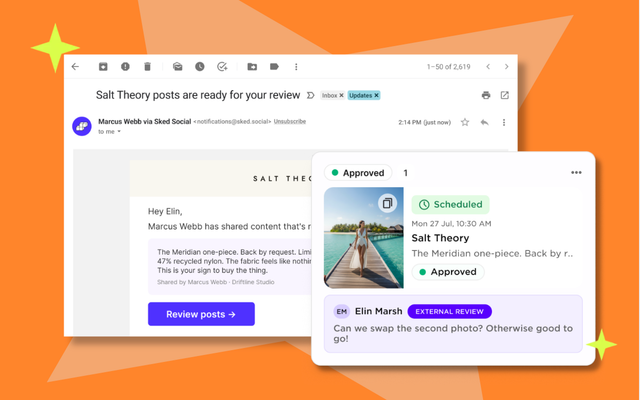
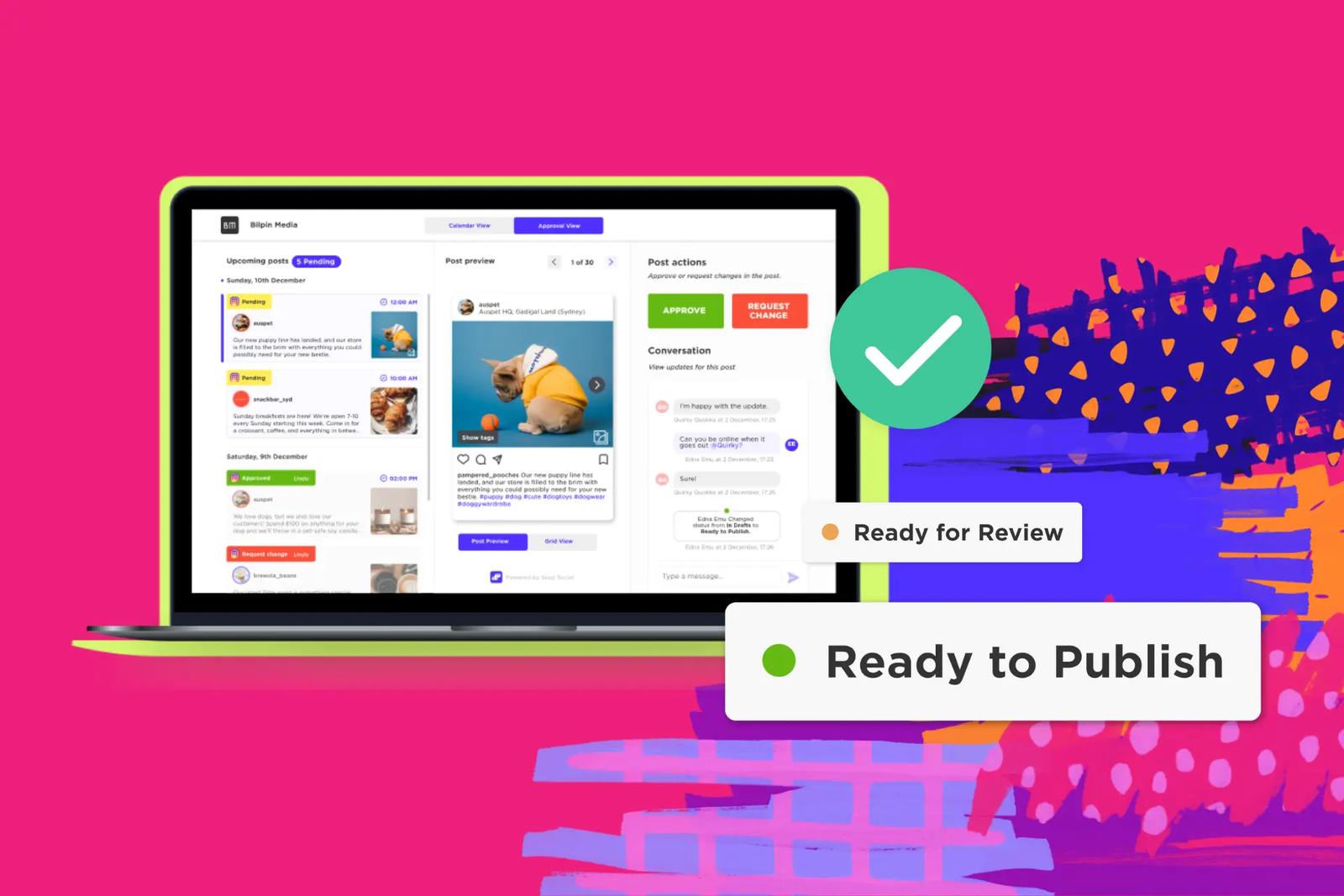
This is the process Sked Social's client approval tool is built around. Reviewers open a branded, no-login review link, see post previews, leave comments, and approve or request changes, with an audit trail of every action. When posts reach your "ready to review" status, reviewers get an email automatically, then daily or weekly reminders at a time you set until their review is done. Approvals are included on the Accelerate and Custom plans.
If you're running this across 10 or more clients at once, our guide to building an agency approval process that survives 15 clients covers the scaling side: standard delivery days, review windows, and weekly pipeline sweeps.
The review request template
Most slow approvals start with a vague request. "Can you have a look at these?" invites a vague answer, a week later. A good request takes the reviewer two minutes to act on:
Hi Sam, here are next week's 12 posts for Instagram, Facebook, and LinkedIn. Please approve or request changes by Thursday at 5 pm. If we haven't heard back, we'll hold the posts and check in Friday morning. Please check the dates, prices, and the competition terms in posts 4 and 9. The visuals follow the spring campaign you approved on the 2nd.
That message names the deadline, says what happens if it's missed, and tells the reviewer exactly where to focus. It also reminds them what they've already approved, which heads off a second debate about the campaign look.
The reviewer checklist
Give every final approver the same short list, in this order:
- Facts. Dates, times, prices, product names, and offer terms are correct.
- Links and tags. URLs work, handles are right, and tagged partners have agreed to be tagged.
- Legal and disclosure. Paid partnerships, gifted products, and competitions carry the right labels and terms.
- Brand fit. Tone, visuals, and language match the brand guidelines.
- Taste. Anything else, phrased as a specific change ("swap image two for the close-up"), not a feeling.
Putting taste last isn't a dig at clients. It's how you stop a debate about emoji from hiding a wrong price.
Where AI fits in social media approvals
AI has changed the drafting side of social fast. It hasn't changed who is accountable for what gets published. The honest version of an AI-assisted approval process is simple: AI drafts, people approve.
The adoption numbers are high. In the Content Marketing Institute's 2026 B2B research, a survey of 1,015 B2B marketers fielded June to August 2025, 95% said their organizations use AI-powered applications. Among marketers using AI for content creation, 87% said productivity had improved. Only 39% said content performance had improved.
That gap matters for approvals. Faster drafting means more posts arriving at the review stage, and more volume is exactly when a weak approval process starts to leak. AI can produce a confident caption with a wrong date, an invented statistic, or a tone that's slightly off for the brand. Someone still has to catch it.
Audiences care, too. In a June 2025 Pew Research Center survey of 5,023 US adults, 76% said it's extremely or very important to be able to tell if pictures, videos, and text were made by AI or by people. Yet 53% said they were not too or not at all confident they could tell. Your clients' audiences are in that group, and so are your clients.
Here's how to fold AI into client sign-off without weakening it:
- Use AI at the draft stage, not the decision stage. AI can write a first caption, suggest variations, or translate a post. A named person still approves it before it publishes.
- Ground the AI in the brand. The less generic the draft, the fewer review rounds it needs. A tool that writes from the brand's own tone of voice and content pillars gives reviewers less to fix.
- Fact-check AI drafts harder, not softer. Treat every number, date, and claim in an AI draft as unverified until someone checks it against the source.
- Agree a disclosure position with the client. Decide together whether and how AI-assisted or AI-generated content gets labeled, and write it into the brand guidelines.
- Route AI drafts through the same approval step. No shortcut lane for "the AI wrote it, so it's fine."
In Sked Social, AI caption tools write captions grounded in your Brand Kit: your brand description, tone of voice, and content labels. You can refine a draft with a plain instruction like "make it shorter", translate it, or try again. The draft then goes into the same approval step as every other post, so the client signs off on the final version, not on the AI.
What to look for in a client approval tool
Email, spreadsheets, and screenshots can carry a client approval process for one or two small clients. Past that, they break in predictable ways: feedback scattered across threads, nobody sure which version was approved, and posts sitting in limbo because a reminder was never sent.
A dedicated approval tool should cover these basics:
- Easy access for reviewers. Clients and stakeholders should be able to review without onboarding into another platform. No-login review links are now common across the category. Hootsuite and Sprout Social also offer them on higher tiers. Judge the experience, not the checkbox: how clear the preview is, and how few clicks it takes to approve.
- Accurate previews. Posts shown as they'll appear on each platform, including images, video, and captions.
- Feedback on the post. Comments attached to the content, with internal notes kept separate from client-facing comments.
- Statuses that match your stages. "Draft", "Internal review", "Client review", "Changes requested", and "Approved" should be visible at a glance.
- Notifications and reminders. Reviewers hear when it's their turn and get nudged automatically if they haven't acted.
- An audit trail. A timestamped record of who approved what.
- A view of everything pending. One screen that shows what's waiting, and on whom.
Here's how Sked Social covers that list on the Accelerate and Custom plans:
- The Approvals Board. Every post appears as a card in a column by approval status. Drag a card to change its status, click to preview it, and filter by status, post type, or label. You can also group cards by content pillar or campaign.
- Custom approval statuses, so the board mirrors your real stages rather than a generic template.
- No-login review links. A branded portal where clients preview posts, leave feedback, and approve, with an audit trail of every approval action.
- Review notifications and reminders. An automatic email when posts are ready, then daily or weekly reminders that stop once the review is done.
- Shared calendars that give clients and stakeholders visibility of what's coming.
For a side-by-side comparison of the options, see our roundup of the best social media approval tools for agencies in 2026.
Common client approval mistakes, and how to fix them
Most broken approval processes fail in the same few ways. Here are the ones we see most often, with the fix for each.
- Too many final approvers. Three people with the power to say no means three rounds of conflicting feedback. Fix: one decision-maker per client or brand. Everyone else can comment, but one person approves.
- No deadline, or a deadline with no consequence. "When you get a chance" means never. Fix: a named deadline in every request, plus an agreed rule for what happens when it passes.
- Clients seeing unreviewed drafts. Sending raw drafts to save time costs more time later, and credibility with it. Fix: internal review is a required step, not an optional one.
- Feedback in five places. A comment in email, another on a call, a third in a text. Fix: if it isn't logged on the post, it isn't feedback yet.
- Approving everything at the same level. A reshare and a product launch get identical scrutiny, so the launch gets less than it needs. Fix: the three-tier split from earlier in this guide.
- Editing after approval. A "tiny tweak" to an approved caption is how a typo gets published with the client's name on it. Fix: any change after approval goes back through approval.
- Never reviewing the process. The chain that worked for three clients creaks at 10. Fix: review it every quarter.
That quarterly review doesn't need to be a big meeting. Look at three numbers. How long does a post take from submission to approval? How many review rounds does the average post need? What share of posts are approved first time? If the first number is climbing, the bottleneck is usually reviewer access or reminders. If the second is climbing, the problem is usually the brief or the internal review. If the third is falling, compare the rejected posts. They often share a cause, like an unclear content pillar or a new stakeholder who was never briefed.
Ask the people inside the chain, too. Creators know which feedback was vague. Clients know which requests were confusing. Small fixes, like a clearer review template or moving the delivery day, often save more time than any new rule. Then check your social media analytics alongside the approval data. If posts that went through a concept round perform better than posts approved only at the final stage, that's a case for moving more content to an earlier review.
Common questions
Client approval questions, answered
What is an AI social media approval workflow?
It's an approval process where AI helps with the drafting and people make the decisions. AI writes or refines captions, often grounded in the brand's tone of voice, and those drafts enter the same review queue as any other post. Reviewers check facts, claims, and brand fit, then a named approver signs off before anything publishes. AI should never be the final approver.
How do I get clients to approve social media posts faster?
Make approving easy and make the deadline real. Batch posts into one review round on a fixed day, send a single link with post previews, and state the deadline and what happens if it's missed. Tell the reviewer exactly what to check. Then automate the nudges, so reminders go out daily or weekly until the review is done.
Should clients have to log in to approve posts?
They shouldn't need to. Most clients review content a few times a month, and a login they rarely use is a common reason approvals stall. A no-login review link lets them preview posts, comment, and approve from any device. In Sked Social, no-login review links are included on the Accelerate and Custom plans.
How long should clients have to approve social media content?
It depends on the content and the relationship. Many teams give routine posts 24 to 48 hours per review stage and allow longer for campaign launches or anything needing legal review. Whatever window you choose, agree it at kickoff, put the exact deadline in every request, and build buffer time for revisions and reviewer vacations.
Who should give final approval on social media content?
One named person per client, brand, or location. Other stakeholders can review and comment, but a single final approver stops conflicting feedback and makes accountability clear. For regulated content, a specialist such as legal or compliance reviews first, and the final approver signs off after.
Which Sked Social plans include client approvals?
Approvals are included on the Accelerate and Custom plans, with no add-on required. That covers the Approvals Board, custom approval statuses, no-login review links, review reminders, and shared calendars. The Grow plan includes two fixed post statuses.
Transform your social media management with Sked Social
Client sign-off usually breaks in the same places. Nobody is sure who has the final say. Feedback is spread across email, calls, and chat. Reviewers don't know what to check, or by when. And now AI is pushing more drafts toward the review stage than ever, which makes every one of those gaps more expensive.
Sked Social gives you one place to run the whole process, from first idea to final report.
- See every post's status at a glance. The Approvals Board lays out every post by approval status, with filters by label and grouping by content pillar or campaign.
- Make your stages visible. Custom approval statuses mirror the way your team and your clients actually review.
- Let clients approve without logins. A branded review link lets clients and stakeholders preview, comment, and approve from any device, with an audit trail of every decision.
- Stop chasing. Reviewers get an email when posts are ready, then automatic reminders until their review is done.
- Draft in the brand's voice. AI caption writing grounded in your Brand Kit gives reviewers better first drafts, and every draft still goes through sign-off.
- Show stakeholders what's coming. Shared calendars give clients and stakeholders visibility of the plan.
The process in this guide works with any tool, or none. What a dedicated tool changes is the effort. The reminders send themselves, the record keeps itself, and you stop rebuilding feedback from four email threads at 5 pm on a Friday.
Approvals are included on the Accelerate and Custom plans. Sked Social is used by 10,000+ marketers, holds a 4.6/5 rating on G2, and is backed by real human support rated 94% CSAT.
If you're comparing options, start with how Sked Social approvals handle client sign-off, then try it with your own clients and your own content.
Ready to make client sign-off the easiest part of your week? Start your free trial today. 14 days, no credit card required.