On this page
- Key takeaways
- What is an agency social media workflow, and why does it beat a content calendar?
- What are the six stages of an agency social media workflow?
- How do you build a client approval process that doesn't stall?
- How do agencies manage multiple clients without mix-ups?
- Who does what? Mapping roles across your agency workflow
- Which tool capability handles each workflow stage?
- Expert tips and best practices for 2026
- Top challenges and fixes
- Agency social media workflow questions and expert answers
- Transform your social media management with Sked Social
An agency social media workflow turns scattered client work into a repeatable system. Here is a six-stage framework, a roles matrix, and a client approval process for 2026.
Key takeaways
- An agency social media workflow is the repeatable system of stages, owners, and hand-offs that moves a client's post from idea to published to reported. A content calendar is only one part of it.
- 33% of B2B marketers still name workflow and content-approval issues a top challenge, down from 41% the year before (Content Marketing Institute, 2025), so the fix is a better process, not another tool.
- Use a named six-stage spine: strategy and planning, content creation, internal review, client approval, scheduling and publishing, then monitoring and reporting.
- Approvals are one of the most common agency bottlenecks. Internal-then-client gating, a drag-to-approve board, and no-login client review keep sign-off moving.
- Sked Social's Approvals Board, Accounts and Groups, and Custom Reports map onto each stage. Approvals are included on Accelerate and Custom, with 3 users on Grow and 6 on Accelerate.
Most agencies do not lose clients because the creative is weak. They lose clients because a post went to the wrong account, an approval sat for four days, or the monthly report showed up late. This guide gives you a named six-stage workflow, a roles matrix, and an approval process you can put to work this week.
What is an agency social media workflow, and why does it beat a content calendar?
An agency social media workflow is the repeatable system of stages, owners, and hand-offs that takes a client's post from idea to published and then to reported. A content calendar is one artifact inside that system: it tells you when a post goes out. The workflow is the operating system around the calendar: the who, how, and in what order. That difference is the whole game.
A content calendar tells you when a post goes out. An agency social media workflow tells you who makes it, who checks it, who signs it off, and what happens after it publishes.
The stakes are real. In the Content Marketing Institute, MarketingProfs, and The MX Group B2B Content Marketing Benchmarks study of 980 B2B respondents, 33% still named managing workflow issues and the content approval process a top challenge in 2025, down from 41% the year before. The number is falling, which means teams that fix their process pull ahead of the ones that keep improvising.
Agencies feel this harder than in-house teams for four reasons. You run multiple clients at once. Each client has several platforms. Every client wants external sign-off before anything publishes. And there is zero tolerance for the wrong post landing on the wrong account. A single tool switch at the wrong moment can put a client's holiday promotion on another brand's feed.
A calendar alone cannot carry that load. What carries it is a defined system where the calendar is the visible surface and everything underneath is structured. In Sked Social, that visible layer is the content calendar and scheduling view, where you see the whole month across every brand and account in one place with drag-and-drop rescheduling. The workflow, though, starts before the calendar, in the Idea Planner, a Kanban-style board that moves a spark from brainstorm to ready to create. If you run client social at any scale, the agency workspace setup is the frame the rest of this article builds on, and it is worth comparing your current stack against a shortlist of social media management tools built for agencies before you commit. The six stages below are that operating system, written down.
What are the six stages of an agency social media workflow?
The six stages of an agency social media workflow are: strategy and planning, content creation, internal review, client approval, scheduling and publishing, then monitoring and reporting. Name the stages and number them: a named framework is easier to teach, easier to audit, and easier to fix when something stalls. Here is the spine.
- Strategy and planning. Objective: agree the monthly plan, content pillars, and key dates per client. Owner: social media manager, with the brand lead. Hand-off trigger: the plan is signed off and ideas are captured.
- Content creation and curation. Objective: produce captions, visuals, and video against the plan. Owner: content creator or designer. Hand-off trigger: a draft is complete and attached to the right accounts.
- Internal review and QA. Objective: catch errors, check brand fit, confirm the right account. Owner: editor or senior manager. Hand-off trigger: the post passes internal checks.
- Client review and approval. Objective: get external sign-off. Owner: client or brand lead, chased by the account manager. Hand-off trigger: the client approves, or requests changes.
- Scheduling and publishing. Objective: queue the approved post at the right time and account. Owner: social media manager. Hand-off trigger: the post is scheduled or live.
- Monitoring, engagement, and reporting. Objective: respond to the community, then prove the result. Owner: community manager and account manager. Hand-off trigger: the report is delivered and the next cycle begins.
Stages three and four are where most agencies lose time. Internal review is often skipped under deadline pressure, and client approval turns into an email thread nobody can follow. We go deep on both in the next section.
Follow one post through the whole system. A retail client wants a spring sale Reel. In stage one it goes on the plan as a promotion tied to a launch date. In stage two a creator drafts the caption and edits the video, attaching it to the client's Instagram and Facebook accounts. In stage three the senior manager checks the offer wording and confirms it is not accidentally queued to another brand. In stage four the client opens a review link, sees the preview, and clicks approve. In stage five the Reel drops into the queue for the best time on sale-launch morning. In stage six the community manager replies to comments, and the account manager pulls the results into the monthly report. Same post, six clean hand-offs, no guesswork.
Each stage maps to a specific area of Sked Social: plan in the Idea Planner and calendar, create in Post Creation and Bulk Create, review and approve on the Approvals Board, schedule in the queue, then monitor and report in the Inbox and Insights. The Approvals Board is the connective tissue between stages three and five.
How do you build a client approval process that doesn't stall?
Build the approval process as a defined five-step sequence (draft, gate, internal review, client review link, publish), not a hopeful email. Approvals are one of the most common agency bottlenecks, and every day a post waits on sign-off is a day of momentum lost.
Here is the sequence that works.
- Draft the post in Create post with the correct accounts attached.
- Instead of scheduling directly, set a status that requires approval.
- Route it internally first, so your own team catches errors before the client ever sees them.
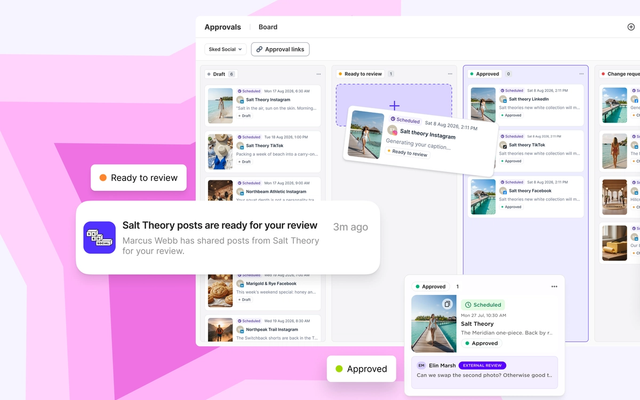
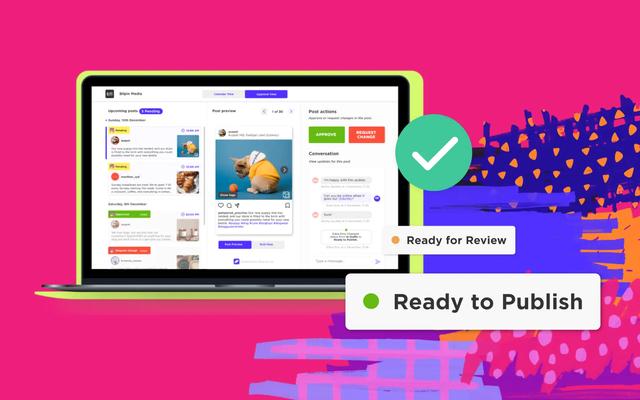
- Send the client a branded review link. They open a portal, see the post preview and a live calendar, and approve, reject, or request changes.
- The post only moves to the queue and publishes after it has the required sign-off.
Two mechanics make this genuinely faster. The first is internal-then-client gating. In Sked Social, internal comments are private to your team and default to internal to prevent an accidental client-facing message, while external notes are what the client sees in the portal. That separation means your team can debate a caption openly without the client reading the sausage being made.
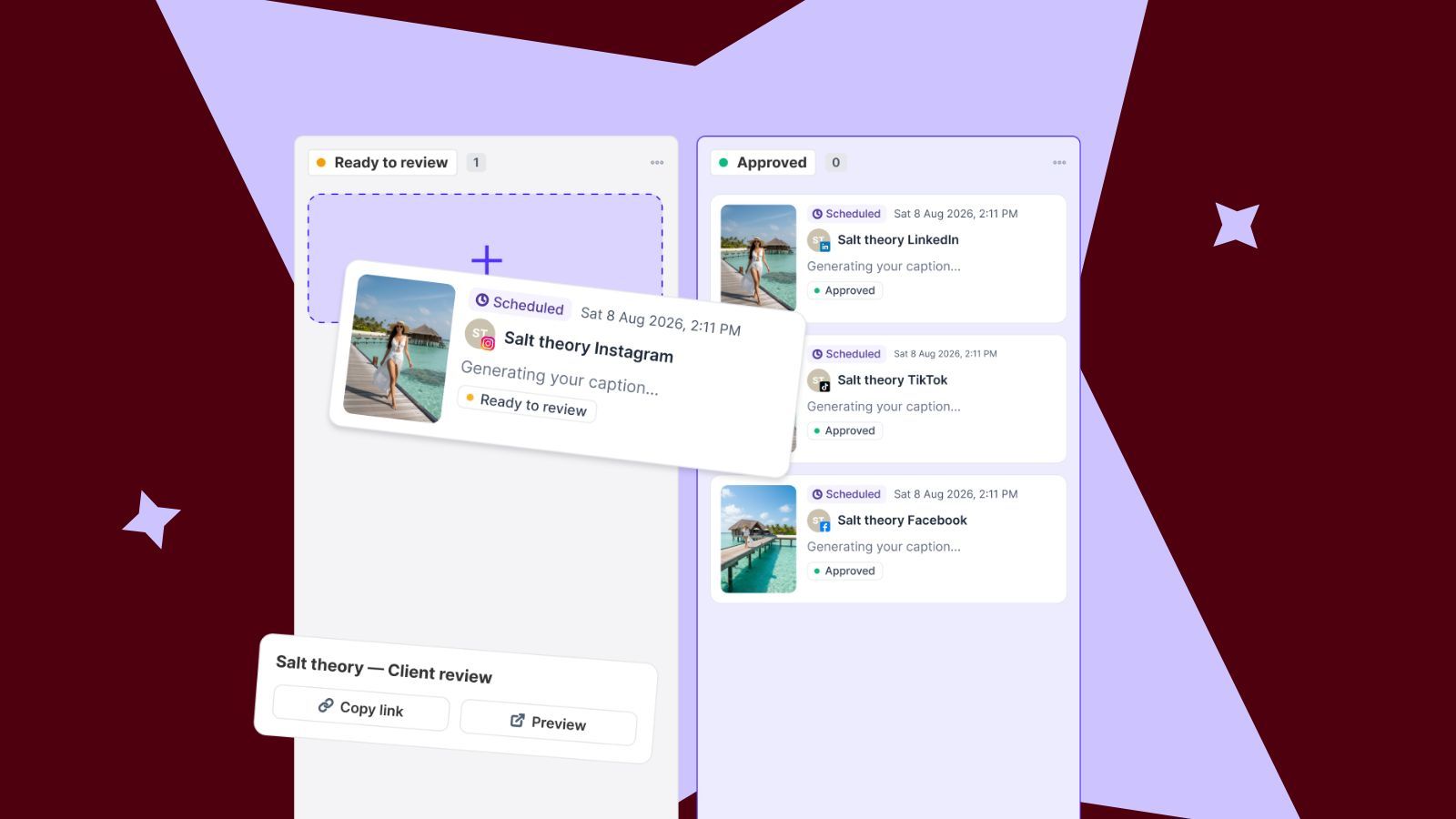
The second is the drag-to-approve board. Clicking Approvals opens a Kanban-style Approvals Board where posts appear as cards grouped by status. You drag a card between columns to change its approval state, hold shift to select several cards, and drag the selection to bulk-change status. Default statuses run grey for work in progress, green for approved, yellow for review pending, and red for changes requested. On Accelerate and Custom you can rename and sequence statuses to match your real process, such as "design ready" then "copy approved". Every action is logged in a full audit trail, which is exactly the accountability regulated clients ask for. You can reinforce that with Sked Social's security and audit posture.
No-login client review keeps clients moving: they approve from a branded link without a Sked Social account or seat, and the drag-to-approve Kanban board is where sign-off actually happens fast. Automated review notifications tell them when posts are ready, and per-reviewer reminders (daily or weekly) chase sign-off until the review is complete, then stop on their own. On plans, Approvals are included on Accelerate and Custom. External review links are included on Accelerate too. For a deeper walk-through built from real agency practice, see how to build an agency approval process that survives 15 clients.
Common mistakes to avoid: no version control, so nobody knows which draft is current. Mixing internal notes with client-facing ones. No reminder cadence, so approvals drift. And approving post by post when you could batch a week of content in one pass.
How do agencies manage multiple clients without mix-ups?
The mechanism is client separation: scope every view (calendar, inbox, reports) to one client group so the wrong-account mistake becomes structurally impossible. The nightmare scenario is simple. You are moving fast, you have the wrong account selected, and a client's post lands on another brand's feed. Multi-client management is really about preventing that, at speed.
In Sked Social, Accounts and Groups lets you create named groups by client, brand, or region, then the group persists as the active filter across the calendar, upcoming posts, inbox, and insights. Filter to one client and the whole workspace scopes to that client. You plan, engage, and report inside a single brand context, which removes the switching errors that cause the wrong-account disaster. For agencies juggling many brands, this is the difference between confidence and constant double-checking.
Onboarding a new client gets faster when the setup is standardized. Connect the client's accounts, drop them into a named group, apply your default statuses and content pillars, and the new client inherits a proven structure on day one instead of a blank workspace. A repeatable group setup is what lets you win a pitch on delivery, not just creative.
Now the honest part, pricing. Seat counts are set per plan: Grow includes 3 users and Accelerate includes 6, and you can add more users on Accelerate at US$15 a month each. Custom is sized by contract. Extra social accounts are an add-on too, so your cost moves with your client roster. External reviewers, remember, do not need a seat at all. Team collaboration and permissions live in one place, so staff and clients see only what they should.
How many clients can one account manager hold? There is no universal number, but many agencies plan for roughly five to 10 client accounts per manager, depending on posting cadence, approval complexity, and how much community management each client needs. That range is a starting point, not a rule. As your workflow matures, with batch scheduling, saved statuses, and client-scoped views, the same person comfortably holds more without quality slipping. Capacity is a function of process, not heroics.
Who does what? Mapping roles across your agency workflow
Most workflow breakdowns are actually role breakdowns. Nobody knew whose job it was to check the offer wording, so nobody did. A simple RACI-style matrix fixes that by naming, for each stage, who is responsible, who approves, and who just needs to be kept in the loop.
Here is a clean starting matrix you can adapt per client. R is responsible, A is the approver or accountable owner, C is consulted, and I is informed.
| Stage | Content creator | Editor | Social media manager | Brand lead | Client |
|---|---|---|---|---|---|
| 1. Strategy and planning | C | C | R | A | C |
| 2. Content creation | R | C | C | I | I |
| 3. Internal review and QA | I | R | A | I | I |
| 4. Client review and approval | I | I | R | C | A |
| 5. Scheduling and publishing | I | I | R/A | I | I |
| 6. Monitoring and reporting | I | I | R | C | A |
The value is clarity. The creator owns the draft, the editor owns internal QA, the manager owns scheduling and drives the client relationship, the brand lead owns strategy, and the client owns final sign-off and accepts the report. No overlap, no gaps.
Role-based access control makes the matrix real. When staff and clients share a workspace, permissions decide who can create, edit, or approve, and which accounts each person can even see. In Sked Social, only admins assign account access, so a junior creator can draft freely while final approval stays gated to the manager or client. That is delegation with guardrails.
Task assignments, deadlines, and @mention comments keep accountability anchored to the specific post rather than scattered across email and chat apps. Discussion happens on the post, not in a thread someone forgets to forward. When a question comes up about a caption, it lives where the work lives, and the right person gets tagged.
Pro tip: write the workflow down, matrix included, and store it where the team works. A documented process is what makes onboarding a new hire or a new client repeatable instead of a memory test. The agencies that scale are the ones whose system survives a staff change.
Which tool capability handles each workflow stage?
Agencies do not need more tools. They need the right capability at each stage, and one place where those capabilities talk to each other. Here is a mapping table from stage to the capability that handles it, so you can audit your own stack against it.
| Workflow stage | What the stage needs | Sked Social area |
|---|---|---|
| 1. Strategy and planning | Idea capture, content pillars, calendar view | Idea Planner and Content Calendar (all plans) |
| 2. Content creation | Post and bulk creation, AI first drafts, brand assets | Post Creation, Bulk Create, AI tools, Brand Kit (all plans) |
| 3. Internal review and QA | Private team comments, status gating | Approvals Board internal statuses (Accelerate and Custom) |
| 4. Client review and approval | No-login client portal, approve or reject, reminders | External review links (Accelerate and Custom) |
| 5. Scheduling and publishing | Queue, best time to post, multi-account calendar | Scheduling and queue (all plans) |
| 6. Monitoring and reporting | Unified inbox, client-branded reports | Unified inbox and Custom Reports |
Two things are worth calling out. Stage six is where agencies prove value and win renewals. Custom Reports lets you assemble multi-account reports with a client or agency logo and brand colors, export to PDF or Excel, and schedule them to send automatically. That client-branded reporting is what turns a monthly update into a retention tool, and it is available on Accelerate and Custom. If you are still building reports by hand, it is worth benchmarking your options against a comparison of social media reporting tools and grounding your metrics in a social-first GA4 setup for agencies.
The community side of stage six matters just as much. A unified inbox pulls DMs, comments, mentions, and tagged posts from across platforms into one view, so no interaction slips through while you are heads-down scheduling.
On AI, be realistic about where it fits. In the same Content Marketing Institute research, 81% of B2B marketers said their teams use generative AI tools, up from 72% the year before, yet only 19% have integrated AI into daily workflows, with most (54%) still using it ad hoc. The lesson for agencies is to slot AI into specific stages, first-draft captions in creation and summaries in reporting, rather than expecting it to run the process. And because audiences are spread across platforms, 84% of U.S. adults use YouTube, 71% Facebook, 50% Instagram, and 37% TikTok in Pew Research Center's 2025 survey of 5,022 adults, your workflow has to run consistently across many channels per client, not just one.
Expert tips and best practices for 2026
Small process choices compound across a client roster. These are the habits that separate agencies that scale from agencies that firefight.
Batch by stage, not by client. Draft a week of captions in one sitting, run internal QA in one pass, then send one batch approval link. Context-switching between clients all day is where hours quietly disappear. Bulk Create exists for exactly this, turning a month of posts into a single upload.
Gate the "no" early. Get concept sign-off before your team spends real hours on production. It is far cheaper to hear "wrong direction" at the idea stage than after the video is edited. Informal thumbs-up and thumbs-down checks inside the Idea Planner are enough for a quick vibe check before anything moves to full creation.
Standardize statuses across clients. Custom approval statuses like "design ready", "legal review", and "ready to publish" should mean the same thing on every account. When your board reads the same way for all clients, anyone on the team can pick up any account without a briefing.
Scope everything to a client group before you start work. Make filtering to the client's group the first move of the day, every day. It removes the arithmetic error that publishes to the wrong brand, and it makes the agency workspace feel like a set of clean, separate rooms rather than one crowded desk.
Report on outcomes, not vanity metrics. Tie content to what the client actually cares about, and let a recurring, client-branded report land automatically each month so you are never scrambling on the first.
Top challenges and fixes
Even a well-designed workflow hits friction. Here are the recurring problems and how to solve each one.
Approvals stall for days. The fix is automated reminders on a set cadence and a single review link, not repeated "did you see my email" chasers. Per-reviewer reminders that stop once the review is done keep the pressure polite and consistent.
Version confusion. When feedback lives in email, nobody knows which draft is current. Keep every comment and status change on the post itself, with a full audit trail, so there is one source of truth per post.
Wrong post, wrong account. This is almost always a switching error. Client-scoped groups that persist across the calendar, inbox, and reports remove the moment where a mistake can happen.
Reporting eats a full day per client. Manual formatting is the culprit. A report builder with saved branding and scheduled delivery turns a day of work into a review and a send.
Urgent or trending content breaks the process. Build a fast lane. Keep the same approval gate but shorten it for time-sensitive posts, use notification posts for trending audio that has to be added natively, and agree in advance who can green-light a same-day post. A structured workflow should bend for urgency, not break.
Every client gets the same rigid workflow. They should not. A boutique client with weekly posts needs a lighter process than a regulated brand with legal review. Adapt the number of approval stages per client while keeping the six-stage spine intact.
Agency social media workflow questions and expert answers
What is a social media workflow, and how is it different from a content calendar?
A social media workflow is the full system of stages, owners, and hand-offs that takes a post from idea to published to reported. A content calendar is one artifact inside that system. It shows when things go out. The workflow covers who does what, how, and in what order across planning, creation, review, approval, scheduling, and reporting.
How do you set up a social media approval workflow for clients?
Draft the post in Create post, set a status that requires approval, and route it internally first. Once your team signs off, send the client a branded review link. They approve, reject, or request changes without logging in, and the post only publishes after the required sign-off. In Sked Social this runs on the Approvals Board, with internal comments kept private and external notes visible to the client.
How many clients can one account manager handle effectively?
There is no fixed number, but many agencies plan for one account manager to hold roughly five to 10 client accounts, depending on posting cadence, approval complexity, and how much community management each client needs. Capacity rises as your workflow matures. Batch scheduling, saved approval statuses, and client-scoped views let the same person hold more accounts without dropping quality.
Can AI automation replace parts of a social media workflow?
AI can speed up specific stages, especially first-draft captions, idea generation, and reporting summaries. It does not replace the strategy, the client relationship, or the approval gate. As of 2025, only 19% of B2B marketers had integrated AI into daily workflows while 54% still used it ad hoc (Content Marketing Institute). Treat it as an assistant inside the workflow, with a human review before anything reaches a client.
What signs indicate your social media workflow needs improvement?
Watch for posts published to the wrong account, approvals that stall for days, version confusion in email threads, last-minute scrambles before publishing, and reporting that takes a full day per client. Any of these means the process, not the people, is the problem. A named workflow with clear owners and a single approval trail usually fixes it.
Transform your social media management with Sked Social
The pattern is clear. Agencies do not win by working harder inside a broken process. They win by running one repeatable system, from first idea to final report, so the wrong-account mistakes, the stalled approvals, and the day-long reports stop happening.
Sked Social is the social media workspace built for that system. Plan in the Idea Planner, create and batch-schedule from one content calendar, gate quality with the internal-then-client Approvals Board, keep every client cleanly separated with Accounts and Groups, and prove the result with client-branded Custom Reports. Clients approve from a branded link with no login and no seat, your team gets 3 users on Grow and 6 on Accelerate included, and pricing scales per account as you land new clients. Real human support backs it.
Ready to transform your social media workflow? Start your free trial today, no credit card required.