On this page
- Key Takeaways
- Who owns paid and who owns organic in a franchise?
- How to run national paid campaigns alongside local organic content
- Local paid budgets, ad funds and co-op money: who pays for what
- How to boost location posts without losing control
- Keep ads and organic posts on brand across every location
- Approve posts and ads before anything runs
- Report paid and organic results by location
- Common franchise paid social mistakes to avoid
- Run paid and organic social for every location with Sked Social
Key Takeaways
- Franchise social media advertising works when paid and organic run as one plan. Head office runs national campaigns and sets the rules, and each location posts local content and puts money behind the posts that already work.
- In the US, Item 11 of the franchise disclosure document has to explain the advertising fund and any local co-op, including how the money was spent. Your paid social rules should start from it.
- US social media ad revenue reached $117.7 billion in 2025, 40% of all US digital ad revenue (IAB/PwC). Customers see those ads in the same feeds as your locations' posts.
- Boost posts that already did well organically, from a short list of approved post types, with a budget cap and an audience preset for each location.
- Sked Social lets you boost published Facebook and Instagram posts in four steps, and only people with the Can Boost Posts permission can do it. Approvals for posts are on the Accelerate and Custom plans.
Franchise social media advertising works when head office runs paid and organic social as one plan. Head office runs the national campaigns, sets the rules for local budgets and co-op money, and decides who can boost which posts. Each location keeps posting local organic content and puts paid money behind the posts that already work in its area. Approvals before anything runs, one brand standard for ads and posts, and reporting by location hold it together.
The paid side is now a big share of what people see. US social media ad revenue reached $117.7 billion in 2025, up 32.6% on the year before, according to the IAB/PwC Internet Advertising Revenue Report. That's 40% of all US digital ad revenue.
Our 80/20 franchise social media playbook covers the organic side: what locations post and how head office governs it. This guide covers the paid side, and the places where paid and organic meet.
Who owns paid and who owns organic in a franchise?
The friction in franchise social rarely starts with a platform choice. It starts with money and decisions. Ads and posts come out of different budgets with different owners, but customers see them in the same feed, next to each other. So write the split down before anyone spends a dollar.
Here's a split that works for many networks:
| Activity | Head office | Each location |
|---|---|---|
| National brand campaigns | Plans them, funds them from the ad fund, and runs them | Shares them and doesn't change them |
| Local ads (offers, openings, events) | Sets templates, budget rules and audience presets | Requests or runs them within the rules, from the local budget |
| Boosting location posts | Decides who can boost, the caps, and which post types qualify | Picks proven local posts to boost |
| Organic posts | Supplies brand content and the campaign calendar | Adds local posts about its team, customers and neighborhood |
| Pages and ad accounts | Owns the business portfolio and grants access | Gets partial access to its own assets |
| Comments on ads and posts | Sets response rules and the escalation path | Replies to local questions |
| Reporting | Rolls up paid and organic results by location | Reviews its own numbers every month |
You'll usually land on one of three models. In a central model, head office runs every ad and each location pays a set local amount. In a local model, locations run their own ads in their own ad accounts, inside written rules.
In a hybrid model, head office runs national campaigns and a local ad program, and locations boost their own posts within caps. The hybrid is a common compromise, because it keeps brand control at the center and local knowledge at the edge.
Whatever the model, settle ownership of Pages and ad accounts first. In a Meta business portfolio, there are two levels of access: full access and partial access.
Partial access limits people to the assets or tasks they've been assigned, which is the right default for a franchisee. Meta also lets the business that owns a Page or ad account share it with a partner business, and only the owner can share it onward. That matters on the day a franchise agreement ends. Have your franchise counsel check that account ownership in the agreement matches what's set up in Meta.
When a franchisee leaves, remove their people from the business portfolio the same day. Because head office owns the Pages and ad accounts, the page and its ad history stay with the brand.
How to run national paid campaigns alongside local organic content
National campaigns belong to head office. They run from the brand's main Page and Instagram account, they're usually paid for from the advertising fund, and they carry the big message: a launch, a seasonal offer, a brand story. Local organic content is what makes that message feel like it's happening down the street.
Plan the two on one calendar. Share the national campaign dates with every location two to four weeks ahead, so local posts support the campaign instead of competing with it. A location running its own discount in the same week as a national price message confuses customers and splits the budget. During a national push, ask locations to pause local boosts aimed at the same people, or to point them at the national offer.
Then give locations a campaign kit for organic posts:
- The national creative in organic formats, with a version for Stories and Reels
- Captions with fill-in fields for the suburb, the team member, and the local offer terms
- Two or three local post ideas that tie into the campaign, like a staff member trying the new product
- The dates the paid campaign starts and ends, so locations know when to post their support content
National money can still target locally. Meta's store set location targeting lets you reach people within a set radius of each of your shops. You can let Meta set the radius based on population density, or choose a fixed radius in miles or kilometers. That's how one national budget can deliver an ad for each location's own neighborhood.
If you want an ad to run under a location's own name, Meta's partnership ads need permission from the partner whose handle appears in the ad. If the same business owns both accounts and the person running the ad has ads access to both, the extra permission isn't needed.
Hiring ads need special care. Ads for jobs at your locations fall under Meta's employment Special Ad Category. For advertisers in or reaching the US, and advertisers reaching Canada and certain European countries, that means no targeting by age, gender or postcode.
Meta's targeting rules also require a radius of at least 15 miles (25 km) around a specific location in the US and Canada, and 10 miles (17 km) in the UK and many European countries. Check the list for your countries before a recruitment drive, and set hiring ads up centrally.
Franchise recruitment ads are a separate job again. They sell the franchise opportunity to future owners, so they belong to head office's franchise development budget, not to location budgets. In the US, Item 11 of the franchise disclosure document also has to state the percentage of advertising funds, if any, that the franchisor uses mainly to solicit new franchise sales.
Local paid budgets, ad funds and co-op money: who pays for what
A franchise system can have up to three pots of advertising money, and social ads can come out of any of them. The advertising fund (often called the brand fund) pays for national work. A local advertising requirement covers what each location spends in its own area. A cooperative pools money from locations in one region for regional campaigns.
In the US, the rules for these pots are already written down. The FTC Franchise Rule requires Item 11 of the franchise disclosure document to describe the advertising program. For a local or regional advertising cooperative, it has to state how the co-op's area or membership is defined, how much each franchisee contributes, and who administers it. For other advertising funds, it has to state:
- Who contributes, and how much each franchisee pays
- Whether franchisor-owned locations contribute on the same basis
- Who administers the fund, and whether it's audited
- Whether franchisees can see the fund's financial statements
- How the money was used in the last fiscal year, including the percentages spent on production, media placement and administrative expenses
Item 11 also covers when franchisees may use their own advertising material, and Item 6 lists advertising and co-op fees. Contribution rates vary from system to system, so check your own documents rather than an industry average. Outside the US, the franchise agreement plays the same role.
So before you write a social ads policy, read Items 6 and 11 and the agreement. Then answer these questions in one page and share it with every franchisee:
- Does a boosted post count toward a location's local advertising requirement?
- Which ad account and payment method does each kind of ad use?
- What proof of spend does head office need? Meta identifies a boosted post as an ad on your bill, which makes boosts easy to reconcile.
- Above what amount does a local ad need head office approval?
- How does a co-op choose which social campaigns to fund, and who reports the results back?
Clear answers here prevent a common argument: a franchisee who boosted posts all year and expects it to count, and a head office that never agreed it would.
How to boost location posts without losing control
Boosting is the paid tool many franchisees will actually use, so it needs the clearest rules. Meta describes a boosted post as an ad you create from an existing post. When you boost, you choose the goal, the ad text, the schedule and duration, the budget, and the placements.
A boost is simpler than a campaign in Ads Manager. Meta says boosted posts don't have as many customization and detailed targeting options as a full Meta ad, and campaign creation and budget settings are only available in Ads Manager. That makes boosting a good fit for local posts and a poor fit for national campaigns. Keep national work in Ads Manager, and let locations boost.
Boost a location post when:
- It already beat the location's usual organic engagement, so you know the content works
- It promotes a local event, opening, or offer that head office has approved
- It answers a question people in the area keep asking, like new opening hours
Then set five rules for every location:
- Approved post types. List what can be boosted, such as events, openings, team stories, and approved offers.
- Budget caps. Set a maximum for each boost and for each month.
- Audience preset. Agree a radius around each store, so neighboring locations aren't paying to reach the same people.
- Duration. Set a standard run, like seven days, unless head office agrees otherwise.
- Comment watch. Someone at the location checks comments daily while the boost runs.
Give boosting rights only after a franchisee has been through these rules, even in a 30-minute session.
One practical tip: if franchisees boost from the Facebook app on an iPhone or iPad, Meta notes that an Apple service fee of 30% of the ad payment may apply. Ask them to boost from a computer instead.
In Sked Social, you can boost published Facebook and Instagram posts without opening Meta Ads Manager. It takes four steps from your published posts: Sked Social checks eligibility and the linked ad account, you pick the audience and objective, you set the budget and duration, then you review and boost. An Account Admin links a Meta Ads account to each group and grants the Can Boost Posts permission person by person.
That puts two controls in head office's hands: who can boost, and which ad account each group's boosts run through. Each boost also has its own budget and duration. Our help guide shows how to boost a post in Sked Social, step by step.
Keep ads and organic posts on brand across every location
Customers don't separate a location's ads from its posts, and they don't separate either from the brand. So use one brand standard for both. The same visual system, the same rules for claims, and the same offer terms apply whether a post is organic or paid.
Ads are also public. Meta's Ad Library contains all active ads shown across Meta technologies, and anyone can search it by Page.
Use that. Once a month, search every location's Page and check what's running. You'll catch out-of-date offers, off-brand creative, and ads nobody at head office knew about.
Three controls keep paid and organic content on brand:
- Templates with locked and open fields. Lock the logo, colors, fonts, and legal text. Leave the photo, the suburb, the team member's name, and the local offer open.
- A claims register. Write down what needs head office sign-off: prices, discounts, end dates, health or results claims, and any mention of a competitor. Anything on the list needs approval before it's posted or boosted.
- Real local photos. A boosted post with the actual team and the actual store looks like the location, not like a stock ad. Give locations a short photo guide so the brand look holds up.
Comments are part of brand consistency too. Meta says that for most advertisers, anyone who can see your ad can react to it or comment on it.
You can hide or report comments on ads from Ads Manager, and comment filters set on a Page or Instagram profile extend to ads from that Page or profile. Agree who answers what. The location answers local questions. Head office takes complaints, anything legal, and anything that could become a brand story.
In Sked Social, Brand Kit stores your brand voice and description on every plan, and the AI caption tools use them when they draft posts. You can also tag posts with labels, like "national campaign" or "local offer", on every plan. On Accelerate and Custom, label analytics show how each type of post performs.
Approve posts and ads before anything runs
An off-brand organic post is a problem. An off-brand ad is a problem you paid to spread. So anything that will have money behind it needs approval before it runs.
Approve by risk for organic content, as our franchise social media playbook explains: routine team and community posts go straight out, while prices, offers, and claims need head office sign-off. Paid content adds a second check. Every ad or boost gets two approvals:
- Content approval. Is it on brand, are the claims accurate, and do the offer terms match what head office agreed?
- Spend approval. Is the budget within the cap, is the audience the location's own area, are the dates right, and is it using the right ad account?
The order matters. Approve the post first, before it's published organically. Then boost only posts that have already been approved. That way, nothing reaches a paid audience that hasn't been checked, and the location can still move fast on a post that's taking off.
Set a turnaround time too, like one business day for local boosts, so approval doesn't become the reason a timely post misses its moment.
Keep a record of who approved what and when. If a franchisee questions why a boost was declined, or a co-op asks how its money was spent, you'll have the answer. Put the approval rules in your franchisee social media policy so every new owner sees them on day one.
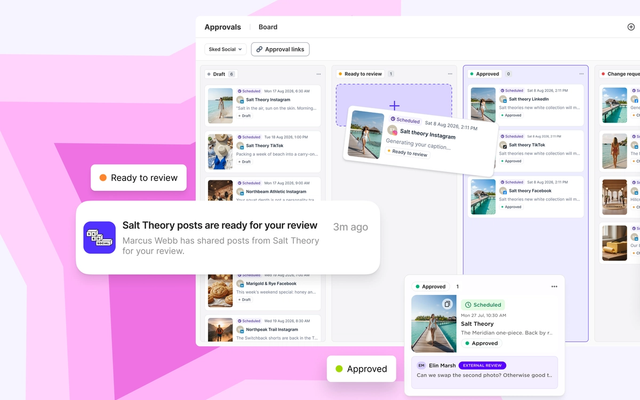
In Sked Social, approvals are included on the Accelerate and Custom plans. Posts move through an Approvals board, and reviewers like franchise owners can approve, reject, or request changes through a review link without a Sked Social login. You can switch on daily or weekly reminders for each reviewer. Pair approvals with the Can Boost Posts permission, and head office controls both what gets posted and who can put money behind it.
Report paid and organic results by location
Reporting by location is how head office proves the program works and spots the locations that need help. It only works if the data maps cleanly to locations, so set that up first.
- One profile per location, named the same way. For example, "Brand Name | Suburb" on every Facebook Page and Instagram account.
- A naming convention for ads. Put a location code in every campaign and boost name, so spend can be split by location.
- Tracked links. Add UTM tags to every link in ads and posts, so website visits show up by location in your web analytics.
- A way to count results. Give each location a promo code, booking link, or tracked phone number, so ads can be matched to bookings and sales in your CRM or point-of-sale system.
Keep paid and organic numbers separate, then compare them. For organic, track posts published, engagement, and how fast each location answers comments and reviews. For paid, track spend, reach, link clicks, and the result you're paying for, like bookings or calls.
Organic page health affects paid results too. In BrightLocal's 2026 Local Consumer Review Survey of 1,002 US consumers, 24% said they visit a business's social media channels after reading its reviews, and 89% expect business owners to respond to reviews. A paid click that lands on a page with unanswered questions is money spent on a weak first impression.
Build a monthly scorecard for each location with both sides on one page. Then look for patterns. A location that spends on boosts but rarely posts organically is buying attention for an empty room. A location whose boosts beat the network average has local content worth sharing with every other location.
In Sked Social, results for posts boosted from Sked Social sit next to organic results. Insights has a Paid Social table grouped by Meta ad account, with views, reach, engagement, link clicks, and follows.
Boosted posts carry a Boosted badge in the organic summaries, and each post's performance view lets you switch between all data and boosted only. Group accounts by region or location to filter the calendar and analytics. On Accelerate and Custom, custom reports put organic and Meta ads results in one report, with an AI summary you can edit before it goes to franchisees.
Common franchise paid social mistakes to avoid
Many problems with franchise ads come from structure, not skill. These are the costly ones.
- Boosting before approving. A boost on an unapproved post puts money behind a mistake. Fix: approve first, then boost only approved posts.
- Ad accounts on personal cards. When the person who set it up leaves, the ad history and billing leave too. Fix: every ad account lives in a business portfolio head office owns, with partial access for locations.
- Overlapping audiences. Two nearby locations boosting to the same city end up paying to reach the same people. Fix: one radius preset per location, agreed with head office.
- Hiring ads in the wrong category. A recruitment ad set up as a normal ad breaks Meta's rules for employment ads. Fix: set hiring ads up centrally, in the employment category.
- Ads pointing to dead pages. A paid click that lands on a page that last posted in March wastes the spend. Fix: only locations that meet the organic posting minimum can boost.
- Unwatched ad comments. Questions on ads go unanswered because nobody checks them. Fix: name an owner for ad comments at every location while ads run.
- Local offers that clash with national campaigns. A location discount in the same week as a national price message confuses customers and splits the budget. Fix: share the national campaign calendar weeks ahead and agree local offer dates around it.
- Reporting spend without results. A spend report shows activity, not value. Fix: report the result each ad was meant to drive, by location, every month.
Start with the first two. Approvals and account ownership are the mistakes that are hardest to undo once money is involved. The rest can be fixed in a week.
Related guides for franchise and multi-location brands:
Common questions
Franchise social media advertising questions
Who pays for social media advertising in a franchise?
It depends on the system, and the franchise agreement decides it. National campaigns are usually paid from the advertising fund. Local ads are paid from each location's own budget.
Regional campaigns can be paid from a co-op that pools money from locations in one area. In the US, Items 6 and 11 of the franchise disclosure document explain the fees and how each fund works.
Should franchisees run their own Facebook ads?
They can, within written rules. Many networks let locations boost their own posts with budget caps and audience presets, while head office runs national campaigns and hiring ads centrally. Head office should own the ad accounts and give locations partial access, so the account stays with the brand if a franchisee leaves.
What is a co-op advertising fund in a franchise?
A co-op, or advertising cooperative, pools money from franchisees in one region to pay for regional advertising. In the US, the franchise disclosure document has to explain how the co-op's area or membership is defined, how much each franchisee contributes, and who administers it.
Should a franchise boost posts or run ads in Ads Manager?
Use both, for different jobs. Boosting turns an existing post into an ad and suits local posts that already work. Ads Manager has more targeting and campaign options and suits national campaigns, lead campaigns and hiring ads. Many franchises let locations boost and keep Ads Manager campaigns with head office.
Can a franchisor take over a franchisee's Facebook ad account?
Not on its own. In Meta's business tools, only the business that owns a Page or ad account can share it with another business, so a franchisee who owns the account has to grant access, and they still own it afterward. That's why head office should own the Pages and ad accounts from day one, give locations partial access, and write ownership into the franchise agreement.
How do you measure paid and organic social for each franchise location?
Name every profile and every ad with a location code, tag links with UTMs, and keep paid and organic metrics separate before you compare them. A monthly scorecard per location should show posts, engagement, response times, spend, and the result each ad was meant to drive.
Run paid and organic social for every location with Sked Social
Franchise social media advertising goes wrong in predictable places: boosts on unapproved posts, ad accounts nobody at head office controls, and reports that show spend but not results by location. Sked Social puts the organic and paid sides of the job in one place.
- Boosting with controls. Boost published Facebook and Instagram posts in four steps, without opening Meta Ads Manager. Only people with the Can Boost Posts permission can boost, through the ad account linked to their group.
- Approvals before anything runs. An Approvals board and no-login review links for franchise owners, on Accelerate and Custom.
- One brand voice. Brand Kit stores your voice and description on every plan, and labels tag posts by campaign.
- Paid and organic reporting. Boosted results next to organic in Insights, and organic and Meta ads in one custom report on Accelerate and Custom.
One franchise customer saves 300 hours a month running social across its locations in Sked Social. More than 10,000 marketers use Sked Social, it's rated 4.6/5 on G2, and 24/7 human support has a 90-second average first response.
See how it works on our franchise social media page, or start your free trial today. 14 days, no credit card required.