On this page
- Key Takeaways
- What a franchisee social media policy covers, and what it doesn't
- Which networks and accounts locations may run
- Account naming and ownership: head office keeps admin access
- What needs sign-off, and in which direction
- Legal and platform rules: disclosures, music, images, and customer privacy
- Crisis and security steps
- Offboarding when a franchisee leaves
- Franchisee social media policy template for 2026
- Run your franchisee social media policy in Sked Social
Key Takeaways
- A franchisee social media policy is head office's rulebook for every location's social accounts. It covers allowed networks and accounts, naming and ownership, sign-off, legal and platform rules, crisis and security steps, and offboarding. How posts look and sound belongs in your brand guidelines, which the policy points to.
- Head office should own every location account and keep admin access. Give each account at least two head office admins and a recovery email on a company address, and give franchisees and their staff the lowest role that lets them do the job.
- Set sign-off by risk. Routine local posts can go out within the guidelines. Offers, prices, contests, paid partnerships, and anything about safety or the law need approval. Write down which way each approval runs: head office to location, or location to head office.
- In Franchise Update Media's 2025 Annual Franchise Marketing Report, 85% of respondents recommend or require local marketing spend, yet nearly half (48%) leave franchisees to track and manage it themselves.
- Sked Social gives head office one content calendar across every location, a Brand Kit for your brand voice and content instructions, and user permissions that control which accounts each person can access. On the Accelerate and Custom plans, approvals let head office or a location review a post before it publishes, including through a link that needs no login.
A franchisee social media policy is head office's written rulebook for every location's social accounts. It sets which networks and accounts locations may run, how they're named, who keeps admin access, which posts need sign-off and in which direction, the legal and platform rules, what to do in a crisis or a hack, and what happens to the accounts when a franchisee leaves.
For a franchise with 40 locations, social media isn't one account. It's 40 Facebook pages, 40 Instagram profiles, 40 Google Business Profiles, and whoever happens to hold the passwords. Without a written policy, each location decides for itself what's on brand, what needs checking, and who gets the login when a manager leaves.
Head office still answers for all of it. A wrong price in one town, a song nobody had the rights to, or a hacked page posting spam lands on the brand, not just the location.
And much of that local activity runs without a referee. In Franchise Update Media's 2025 Annual Franchise Marketing Report, 85% of respondents recommend or require local marketing spend, yet nearly half (48%) leave franchisees to track and manage it themselves.
This guide is for the head office team that signs posts off with each location. It takes each clause in the order you'd write it, then gives you a template to copy into your operations manual. It isn't legal advice. Have your franchise lawyer check the ownership, termination, and disclosure clauses against your franchise agreement and local law.
What a franchisee social media policy covers, and what it doesn't
A franchisee social media policy answers one question for every location: what are we allowed to do on social media in the brand's name, and who decides? It's a governance document. It sets rules, owners, and steps. It doesn't teach anyone how to write a good caption.
That's why it works best as one of four documents, each with its own job:
| Document | What it decides | Who signs or follows it |
|---|---|---|
| Franchise agreement | Who owns the trademarks, the accounts, and the content, and what happens at termination | The franchisee signs it once |
| Franchisee social media policy | Which accounts exist, who has access, what needs sign-off, legal rules, crisis steps, and offboarding | Each franchisee and every account admin acknowledges it, and you update it as rules change |
| Brand and voice guidelines | How posts look and sound: logo use, colors, photo style, tone of voice, hashtags | Everyone who creates content follows it |
| Employee social media policy | What staff may post on their own personal accounts | The franchisee's own employer policy |
Keep the documents apart. The agreement changes rarely and needs a lawyer. The policy changes when a platform or a law changes, so it should live in your operations manual, where you can update it without reopening every agreement.
The brand guidelines change with your marketing. If tone of voice is the gap, start with our guide to social media voice guidelines for a franchise.
The last row matters more than it looks. Staff at a franchised location usually work for the franchisee, not for head office. Your policy can set what staff may do on the location's accounts and how they may use the brand name. What they post on their personal profiles in their own time is a matter for the franchisee's employee policy and local employment law.
Keep your staff rules about the accounts themselves, and have your lawyer check them, because wording that reads like head office managing the franchisee's employees can raise employment-law questions.
A useful policy is short enough to read and specific enough to act on. Aim for something a new location manager can read in 15 minutes, with every rule written as an instruction: "Register every new account with head office before you post", not "accounts should be managed responsibly". Each section below becomes one clause in the template at the end.
Which networks and accounts locations may run
Start with a list. Your policy should name every network a location may use, the purpose of each one, and who runs it. Anything not on the list needs head office's written approval first.
First, choose your account model. There are three common ones:
- Head office runs every account. You get full control and consistency, but local posts depend on head office capacity, and location managers often feel left out.
- Locations run their own accounts under the policy. Local posts happen fast, but quality varies and head office has to keep checking.
- A shared model. Head office publishes brand campaigns to every location's page, and each location adds local posts within the guidelines. This is where sign-off in both directions comes in.
Then write the account list. A typical version for a services or food franchise looks like this:
- Facebook page and Instagram account per location: allowed, run under the shared model.
- Google Business Profile per location: required. Head office owns the listing, and the location keeps hours, photos, and posts current.
- TikTok per location: allowed with head office approval, once the location shows it can post regularly.
- LinkedIn: head office only, for franchise recruitment and brand news. Locations share from it.
- Everything else: not allowed without written approval.
Add three rules that stop common problems. First, no location creates a new account without registering it with head office. Second, every existing account is listed in one account register, including the ones a former manager set up and forgot.
If you suspect unofficial pages are out there, run an inventory before you publish the policy. Our multi-location Instagram profile audit shows how to find and check every location profile. The third rule: unofficial or duplicate pages are claimed, merged, or closed, never left running.
Finally, cover personal accounts. A franchisee can say on their own profile that they own the local location. They can't use the brand logo as their profile photo, the brand name as their handle, or speak for the brand on brand-wide issues. Spell this out, because the line between "my business" and "the brand" is where disputes tend to start.
Account naming and ownership: head office keeps admin access
Every location account should look like part of one family. Set a naming convention and apply it on every network, so customers find the right location the first time:
- Display name: [Brand] [Suburb or city], for example "Brand Name Northside".
- Handle: @brandname.suburb, or @brandname_suburb where dots aren't allowed. If that handle is taken, add the state or region, never a nickname.
- Profile photo: the current brand mark from head office, never a local photo.
- Bio or about text: head office's template, with one local line for the address, hours, or local offer.
Ownership comes next, and it's the clause you'll be glad you wrote. The franchise agreement should state that the franchisor owns every account that uses its trademarks, along with the handle, followers, and content, and that the franchisee operates the account under license while the agreement runs. The policy then turns that into practice.
That practice is admin access. Head office keeps it on every account, and the franchisee works under it:
- At least two head office admins on every account. One admin is a single point of failure: if that person leaves or loses their login, you may lose the page. Meta's business help recommends having more than one person with full control of a business portfolio.
- Recovery details on a company address. The account's email and phone number should belong to head office, never a manager's personal email.
- The lowest role that does the job. Location staff get a role that lets them post and reply, not one that lets them add or remove people. On a Facebook page, for example, that means task access rather than full control.
- Individual logins, never shared passwords. Every person who touches an account has their own login, so you can remove one person without locking out everyone.
- No account owned by an agency. If a franchisee hires an agency or freelancer, they follow the policy, work under their own login, and never become the account's owner.
- Ad accounts owned by head office. Local paid ads run from ad accounts head office owns. A franchisee can fund local ads, but the account and its audiences stay with the brand.
- Multifactor authentication on every login. The US Cybersecurity and Infrastructure Security Agency tells businesses to require multifactor authentication wherever possible, starting with admin accounts.
Record all of it in the account register: location, network, handle or URL, admins, recovery email, and the date access was last reviewed. Review access every quarter and every time someone leaves.
A social media management tool can take some of the load. In Sked Social, user permissions control which connected accounts each team member can access, so a location manager can work on their own location's accounts without seeing the rest of the network. Whichever tool you use, check that head office stays an admin on the social accounts themselves, not only inside the tool.
What needs sign-off, and in which direction
Sign-off is where franchise policies often go wrong, in one of two ways. Either nothing is checked and the brand finds out from a customer, or everything is checked and local posts arrive three days after the event. Set sign-off by risk instead.
Start by deciding which way each approval runs, because it runs both ways in a franchise:
- Head office to location. Head office writes a campaign post for every location. Each location checks the local details before it goes to its page: opening hours, prices, stock, and whether the photo matches the store.
- Location to head office. A location writes a local post. Head office checks the brand, the legal points, and any offer before it goes live.
Then put it in a table your locations can follow without asking:
| Post type | Sign-off | Direction | Turnaround |
|---|---|---|---|
| Community, team, and behind-the-scenes posts within the guidelines | None needed | No approval | Post any time |
| National campaign posts | Location confirms local details | Head office to location | 2 business days |
| Local offers, prices, and events with a deadline | Head office approves | Location to head office | 2 business days |
| Contests and giveaways | Head office approves the post and the rules | Location to head office | 5 business days |
| Paid partnerships, creator posts, and gifted products | Head office checks the disclosure | Location to head office | 5 business days |
| Hiring posts | Head office approves the template once; the location fills in details | Location to head office | First use only |
| Complaints about safety, legal threats, or media questions | Don't reply. Escalate | Location to head office | Within 1 hour |
Name the approvers by role, with a backup for each, so a post never waits on someone who's on leave. Set a rule for silence too: if a location hasn't confirmed a campaign post by the deadline, does it publish as written or stay on hold? Either answer works. Not having one doesn't.
Turnaround times keep sign-off honest. If head office can't approve a local offer in two business days, the policy will be ignored, and the posts will go out anyway.
Give locations a clear no-approval lane too. A location can post without sign-off when the post uses approved brand assets or its own photos, follows the brand guidelines, and has no offer, price, contest, partnership, or complaint reply in it. Locations never post:
- Prices, offers, or claims head office hasn't approved
- Politics, religion, or comments about competitors
- Customer details, private messages, or photos of people who haven't agreed
- Music, images, or video they don't have the rights to
- Confidential information about the business or the franchise system
- Anything about a safety incident, a legal dispute, or a media story
If a post touches any of these, it goes to head office first.
This is the part of the job a social media management tool should carry for you. Sked Social puts every location's posts on one content calendar, so head office can see what's scheduled for each location and when.
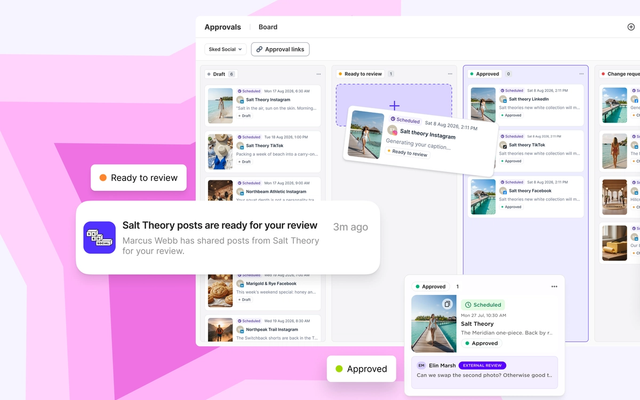
On the Accelerate and Custom plans, approvals let your team submit a post for review before it publishes. Reviewers approve, reject, or ask for changes, and posts only publish once approved. A location manager or franchisee can review through a link without a Sked Social login, and review reminders follow up until they've done it. See how Sked Social approvals and multi-location social media management fit together.
Legal and platform rules: disclosures, music, images, and customer privacy
This section of the policy protects the location as much as the brand. Write it as plain instructions, then have your lawyer check it. The examples below use US rules. Other countries have their own advertising, privacy, and consumer law, so adapt the clause for each market you operate in.
Disclosures. When someone is paid, gifted a product, or otherwise connected to the brand and posts about it, the connection has to be disclosed. The US Federal Trade Commission's Endorsement Guides, revised in 2023, say disclosures must be clear and conspicuous, and the FTC notes that a platform's built-in paid partnership label may not be enough on its own. Your policy should cover three cases:
- Creators and influencers a location works with must disclose the relationship in the post itself, and head office checks it before the post goes live.
- Staff posting about the business, including on their own accounts, should make clear they work there. The FTC says listing an employer on a profile page isn't enough.
- Franchisees who post about the brand on personal profiles should say they own a location.
Reviews. The FTC's rule on consumer reviews and testimonials, in force since October 2024, bans fake reviews, buying positive or negative reviews, suppressing reviews through threats or false accusations, and buying fake followers. It also requires a clear disclosure when insiders write reviews. Translate that into rules your locations can follow: never write or pay for reviews, never ask staff or family to post them, never offer a reward only for a positive review, and never try to get honest negative reviews taken down.
Replies matter too. In BrightLocal's 2026 Local Consumer Review Survey of 1,002 US adults, 89% of consumers expect business owners to respond to reviews. So say who replies: the location answers routine reviews within your response time, and any review that mentions safety, discrimination, or a legal threat goes to head office first.
Music. The popular music in a social app is usually licensed for personal use, not for promoting a business. Meta says Instagram's music library is for personal, non-commercial use, and some business accounts can't use it at all. TikTok tells businesses to use its Commercial Music Library for commercial posts. So locations should only use business-cleared audio, such as Meta's royalty-free Sound Collection or TikTok's Commercial Music Library, or music head office has licensed. "I bought the song" doesn't mean you can use it in a business post.
Images and video. Use photos and video that head office supplies, that the location shot itself, or that are properly licensed. Never take images from a search engine or another business's page. Repost customer photos only after asking the customer and getting a yes in writing, and keep that reply.
AI-generated content. If a location uses AI to write captions or make images, a person checks every post for facts, prices, and claims before it goes out, the same as any other post. Don't use AI images that show real customers, staff, or another brand's logo, and never present an AI image as a real photo of the location.
Customer privacy. Never post a customer's name, order, booking, or health details in a public reply. Move complaints to a private message or a phone call. Get consent before posting a photo where a customer's face, a child, or a screen with personal details can be seen, and never screenshot a private message to post publicly.
Contests and trademarks. Each network has its own promotion rules, and many places regulate prize draws, so head office approves every contest's rules before launch. Never alter the logo, and never use another company's trademark or characters without permission.
Crisis and security steps
Every location will face an angry comment. Some will face a viral video, a food safety complaint, or a hacked account. Your policy should make the first hour boring: everyone knows what level the problem is, who to call, and what not to do.
Define three levels:
- Level 1, routine complaint. A late order, a rude interaction, a price question. The location replies within your response time, using head office's approved replies, and moves the conversation to a private message.
- Level 2, serious complaint. Anything about safety, discrimination, a legal threat, or a post getting unusual attention. The location doesn't reply beyond a short holding line and tells head office within one hour.
- Level 3, brand crisis. A media question, an incident at a location, or something spreading across locations. Only head office speaks for the brand. Locations stay silent and stop scheduled promotional posts.
For Level 2 and 3, give every location the same five steps:
- Take screenshots of the post, comments, and any messages, with the time.
- Don't delete anything, and don't argue in the comments.
- Call the head office crisis contact on the contact sheet, not just an email.
- Use only the holding statement head office provides.
- Hold scheduled posts for the affected locations until head office says to resume.
Then cover security, because a hacked location page is a crisis of its own. If a location loses access, or the account posts something nobody wrote, the steps are:
- Tell head office straight away. Head office admins can often remove the intruder and restore access faster than the location can.
- Use the platform's official hacked-account process. Never pay anyone who offers to recover the account.
- Change passwords, check the list of admins and connected apps, and remove anyone you don't recognize.
- Turn multifactor authentication back on for every login.
- Once the account is back, post one short note telling followers about any messages they shouldn't trust.
Keep a one-page contact sheet in the policy: the head office crisis contact and a backup, legal, and the person who can reach each platform's business support. Update it whenever someone changes roles.
Two Sked Social features help head office see the whole network during a problem. The content calendar shows every scheduled post across your locations, so you can find the posts to hold. The Sked Social inbox brings comments and messages from connected accounts into one place, so head office can spot the same complaint showing up at more than one location.
Offboarding when a franchisee leaves
A franchisee can leave in several ways: they sell the location to a new owner, the agreement ends or is terminated, or the location closes or moves. Each one changes who should have access to the accounts. The offboarding clause decides what happens on the day, and it only works if the ownership and admin rules above are already in place.
Use the same checklist every time:
| Step | Owner | When |
|---|---|---|
| Remove the outgoing franchisee's and their staff's access on every network | Head office admin | Exit day |
| Remove them from every tool that publishes to the accounts, including your social media management tool | Head office admin | Exit day |
| Confirm head office admins, recovery email, and recovery phone on each account | Head office admin | Exit day |
| Change any password that may have been shared, and check multifactor authentication | Head office admin | Exit day |
| Review scheduled posts and cancel anything that no longer applies | Head office social team | Exit day |
| Detach the franchisee's payment method from any ad account, and keep the audiences | Head office and finance | Before the next billing date |
| Update the account register | Head office social team | Same week |
Then follow the path for how the franchisee left:
- Sale to a new franchisee. The accounts, handle, and followers stay with the location. The new franchisee signs the policy and gets operating access only after that. The page keeps its history, and the new owner posts a short introduction.
- Termination or non-renewal. Head office takes over the accounts until a new operator is in place. If the location stays open under head office, keep posting at a lower rate rather than going dark.
- Closure. Post a short closing note pointing to the nearest location, mark the Google Business Profile as permanently closed, and decide with your lawyer whether to keep the other accounts dormant, merge them, or close them. Don't give up a handle that carries the brand name, so nobody else can claim it.
Content needs a rule too. Your agreement and policy should say who owns the photos, video, and posts created for the location. Usually that's the franchisor, under the same ownership clause as the accounts.
Staff leave far more often than franchisees do. Run the first four steps of the checklist whenever a location manager or anyone with account access leaves, not only when the franchise changes hands.
Franchisee social media policy template for 2026
Copy this template into your operations manual and replace everything in square brackets. Keep each clause short. If a clause needs more detail, link to a separate procedure rather than making the policy longer.
1. Purpose and scope. This policy sets the rules for every social media account that uses the [Brand] name or trademarks. It applies to every franchisee, every franchisee employee with access to a location account, and the head office social team. It sits alongside the franchise agreement, the [Brand] brand guidelines, and each franchisee's own employee policy.
2. Approved networks and accounts. Each location may run: [Facebook page], [Instagram account], [Google Business Profile], and [TikTok, with head office approval]. [LinkedIn] is run by head office only. No other account may use the [Brand] name without written approval from [role].
3. Account register. Every account is recorded in the head office account register with its handle, admins, recovery details, and date of last access review. Unregistered accounts will be claimed, merged, or closed.
4. Naming. Display name: [Brand] [Suburb]. Handle: @[brand].[suburb]. Profile photo and bio follow the templates in [link to brand guidelines].
5. Ownership and access. [Brand] owns every account, handle, follower list, and piece of content created for it. Head office keeps at least two admins on every account. Recovery email and phone are head office addresses. Franchisees and staff receive the lowest role needed. Every person uses their own login with multifactor authentication. Passwords are never shared. Agencies and freelancers follow this policy and never own an account.
6. Sign-off. Posts follow the approval table in [appendix A]. Approvers: [role] for local offers, [role] for contests and paid partnerships, [role] for crisis replies. Approvals are given within [2] business days. If a location doesn't confirm a campaign post by the deadline, it [publishes as written / stays on hold].
7. Legal and platform rules. Disclose every paid, gifted, or employee connection in the post. Never write, buy, or reward reviews, and never hide honest negative reviews. Use only business-cleared music or music head office has licensed. Use only supplied, self-shot, or licensed images, and repost customer content only with written permission. Never share customer details publicly. Head office approves every contest's rules.
8. Responses and escalation. Locations reply to routine comments within [24 hours] using approved replies. Level 2 issues are reported to [contact] within one hour. In a Level 3 crisis, only [role] speaks for the brand.
9. Security. Report any lost access or unauthorized post to [contact] immediately. Follow the security steps in [appendix B].
10. Offboarding. When a franchisee or any account user leaves, head office removes their access on the exit day and follows the checklist in [appendix C].
11. Breaches. Breaches follow four steps: a written warning, a fix-by date, suspension of the location's posting access, and then a default under [section of the franchise agreement]. Head office may remove a post at any step, and tells the location what was removed, why, and what needs to change by [date].
12. Review. [Role] reviews this policy every [12 months] and after any major platform or legal change. Franchisees acknowledge each new version in writing.
Before you send the template to your locations, check three things: your lawyer has reviewed clauses 5, 7, 10, and 11 against your franchise agreement; every [role] has a real name behind it; and the approval table matches what head office can actually turn around. Then roll it out with a short training call, and ask each franchisee to sign the acknowledgement. For the strategy side of local social, from content mix to measurement, see our franchise social media strategy guide.
Common questions
Franchisee social media policy questions
What should a franchise social media policy include?
A franchise social media policy should include the approved networks and accounts for each location, a naming convention, account ownership and admin access, sign-off rules with the direction of each approval, legal and platform rules on disclosures, reviews, music, images, and privacy, crisis and security steps, offboarding steps for when a franchisee leaves, and how breaches and policy reviews are handled.
What is the difference between a social media policy and brand guidelines?
A social media policy is a governance document. It sets the rules, owners, and steps: who can run which accounts, who keeps access, what needs approval, what is legally off limits, and what to do in a crisis. Brand guidelines set how posts look and sound, covering logo use, colors, photo style, tone of voice, and hashtags. Keep them as separate documents, and have the policy point to the guidelines.
Who should own a franchise location's social media accounts?
Franchisees can run their location's accounts, but the franchisor should usually own every account that uses its trademarks, including the handle, followers, and content, with the franchisee operating the account under license. Head office keeps at least two admins on each account and the recovery details on a company address. The franchise agreement should state the ownership, and a lawyer should check it against local law.
Do franchisees need approval before posting on social media?
Not for every post. Set approval by risk instead. Routine community and team posts can go out within the brand guidelines. Local offers, prices, contests, paid partnerships, and anything about safety or legal matters need head office approval first. Campaign posts written by head office can need a location's confirmation of local details before they publish.
What should franchisees never post on social media?
Franchisees should never post prices, offers, or claims head office hasn't approved, political or religious content, comments about competitors, customer details or private messages, photos of people who haven't agreed, music or images they don't have the rights to, confidential business information, or anything about a safety incident, a legal dispute, or a media story. Posts like these go to head office first.
What happens to a location's social media accounts when a franchisee leaves?
If the franchisor owns the accounts, they stay with the location. Head office removes the outgoing franchisee's and their staff's access on the exit day, confirms its own admin and recovery details, and reviews scheduled posts. On a sale, the new franchisee gets access after signing the policy. On a closure, head office posts a closing note and decides whether to keep, merge, or close the accounts.
Run your franchisee social media policy in Sked Social
A policy only works if it's easy to follow on a busy Tuesday. Head office needs to see every location's posts, know which ones are waiting on sign-off, and keep control of who can post where, without giving every franchisee the keys to the whole brand.
Sked Social helps head office run the policy day to day:
- Sign-off in either direction. On the Accelerate and Custom plans, approvals let head office or a location review each post before it publishes. Location managers can review through a link without a Sked Social login.
- One calendar for every location. The content calendar shows what's scheduled across your network, so you can spot gaps, clashes, and posts to hold.
- Brand rules in one place. Brand Kit holds your brand description, tone of voice, and content instructions, which Sked Social's AI caption tools use when they suggest copy.
- Access by account. User permissions control which accounts each team member can access.
Sked Social is used by 10,000+ marketers, holds a 4.6/5 rating on G2, and is backed by 24/7 human support rated 94% CSAT. One franchise customer saves 300 hours a month.
Ready to put your policy into practice across every location? Start your free trial. 14-day free trial, no credit card required.