On this page
Key Takeaways
- 62.1% of marketing teams already use six or more tools (MarTech, 2025), adding another standalone approval tool makes the problem worse, not better.
- Client access without a login is now common across the main tools. The differences are who can give the final sign-off without an account, on which plan, and whether you can see every pending post across clients in one view.
- The right question isn't "which tool has approvals?" It's "which tool was built for the way agencies actually work at volume?"
The best social media approval tools for agencies in 2026 let clients sign off from a link, show every pending post across clients in one view, and keep a timestamped record of who approved what. Sked Social, Sprout Social, Hootsuite, Planable and Later all have approvals, but they split on whether a client can approve without an account and which plan that takes.
The approval process is where most agency client relationships quietly fall apart. Not dramatically, but in the way where posts go live with last month's pricing, nobody can find the thread where the client said yes, and your account manager is playing detective at 9am on Monday.
For agencies under five clients, almost any tool can hold it together. The trouble starts later, quietly, when the volume of clients crosses a line and the email threads, the screenshots, and the "looks good!" replies stop being charming and start being a liability. This is a guide to picking a tool that survives that line, so you can build an approvals process that does too.
Why approval delays get expensive at scale
There's a direct line between a broken approval process and your agency's ability to operate at scale. It's not just the frustration: it's the compounding cost of time spent on things that shouldn't take time.
When posts are waiting for approval in email threads and WhatsApp messages, account managers spend hours chasing clients instead of thinking strategically. When there's no central view of what's pending, team leads can't prioritize. When there's no audit trail, you spend time reconstructing history instead of moving forward. When approved content lives in a different tool from your scheduler, every post has a manual handoff.
62.1% of marketing teams already use six or more tools, according to the 2025 State of the Marketing Technology Stack report from MarTech. Adding yet another standalone approval tool compounds the problem: more context switching, more logins, more places for things to fall through.
The agencies that run clean at 15 clients aren't trying harder. They've built a process that removes friction at every step: one place to review, one link for clients to click, one view to understand where everything stands.
That's not process optimization for its own sake. It's a structural decision about which tools belong in your stack.
What to look for when evaluating approval tools
Before you commit to any tool, test it against these eight criteria:
- Client access without a login. Non-negotiable. Test it yourself: can a client click a link and review a post without signing up for anything?
- Visual post preview. Does the reviewer see the actual post, image, caption, format, not just a title or description?
- A pipeline view across all clients. Can you see every pending post across all client accounts from a single view? Is the status of each post immediately obvious without clicking into each one?
- Drag-and-drop status changes. Being able to move a card from "pending review" to "approved" in a single drag is faster and more intuitive than navigating into each post and clicking a dropdown.
- Audit trail with timestamps. Does the tool log who approved what, and when? Can you reference this if there's a dispute?
- Multi-account management. Can you manage multiple client accounts cleanly from a single dashboard, with clear separation between them?
- Integrated scheduling. Is approvals and scheduling the same tool? Or will you be exporting approved content somewhere else?
- Permissions and access control. Can you assign different access levels to team members, set up specific reviewers per client, and control what each person can see and do?
Not every tool will score well on all eight. Where you're willing to make trade-offs depends on your agency setup, but external client access and a visual pipeline view are the two that matter most at volume.
The three types of approval tools (and their trade-offs)
Most tools in this space fall into one of three categories. Knowing which type you're evaluating changes how you assess the trade-offs.
Type 1: Full social media platforms with approval built in. Tools like Sked Social, Hootsuite, and Sprout Social are complete scheduling and analytics platforms that include an approval process. The advantage: everything is in one place. Approved content flows directly into the scheduling queue without any manual handoff. The risk: approval UX is sometimes an afterthought on platforms built primarily around scheduling and publishing.
Type 2: Approval-first collaboration tools. Tools like Planable are designed specifically around content review and approval. They often have excellent visual interfaces and external reviewer access baked into the core product, and they schedule and publish too. The trade-off shows up around the edges: the wider stack most agencies need (analytics, a unified inbox, social listening) tends to be a paid add-on or simply absent, so you end up topping up with other tools anyway.
Type 3: General project management tools adapted for content approvals. Some agencies use Trello, Asana, or Notion to manage content approval. It works, roughly, until it doesn't. These tools weren't built for social media post previews or external client reviewer access, and the gaps show clearly when you're managing volume across 10+ clients.
For most agencies managing 10 or more clients, the real choice is between Type 1 and Type 2: a platform built scheduling-first with approvals added, or one built approval-first with a lighter wider stack. Both can publish. The question is which gaps you can live with.
The argument for a fully integrated platform compounds over time. Approvals, scheduling, analytics, and inbox in one place means no topping up with extra tools and no content copied between them. If your reviewing, publishing, and reporting all live together, the difference adds up across 40 posts a week.
How the main tools compare
| Tool | Approvals start on | Client sign-off without an account | Pricing basis |
|---|---|---|---|
| Sked Social | Accelerate and Custom | Yes: clients approve from a no-login review link | Per plan: Accelerate US$249/mo, or US$208/mo billed annually, 6 users included |
| Sprout Social | Advanced | Yes: up to 3 external approvers, from email prompts | Per seat: Advanced US$399/seat/mo, billed annually |
| Hootsuite | Advanced and Enterprise | A team member records a client's outside sign-off on the post | Per user: from US$99/user/mo (Standard), billed annually |
| Planable | Basic (optional), Pro (required), Enterprise (multi-level) | View and comment by link; formal approval needs a free approver account | Per workspace: from US$33/workspace/mo, billed annually |
| Later | Growth | Feedback by link without an account; approval happens inside Later | Per plan: Growth US$37.50/mo, billed annually |
- Hootsuite: Approvals sit on the Advanced and Enterprise plans, with up to three layers of approvers and an approval history that shows who sent, edited and approved each post. When a client signs off outside Hootsuite, a team member can record that approval on the post so it still shows in the history. Hootsuite prices per user, so the bill grows with your team as well as your client list.
- Sprout Social: A properly built approval process with role-based permissions and solid audit logging. It does offer no-login external approval: up to three external approvers without a Sprout account can approve or reject posts from email prompts, but only on its top Advanced tier. Combined with per-seat pricing that starts high, a 10-person agency across 20+ client accounts adds up fast.
- Later: Built primarily for visual content planning, and good at it. Growth and above include internal and external collaboration and approvals, and people without a Later account can open a shared post link and leave feedback. What it isn't is a volume-first agency system: outside review is link-and-comment rather than a board you run across many clients, and each plan includes a set number of social sets, with extra sets charged as you add brands.
- Planable: Purpose-built for content collaboration and review, with strong visual post previews, comment threads per post, and scheduling and publishing to nine platforms. Anyone with a share link can view and comment without an account. Planable's own approvals guide says formal approval needs a free Planable approver account, so a client who signs off is invited to the workspace. Required approvals start on Pro and multi-level approvals are Enterprise only. On Basic and Pro, analytics, a unified inbox and social listening are paid add-ons, and pricing is per workspace, usually one per client, so the bill climbs with every account you add.
- Sked Social: Approvals, including no-login client review, come with Accelerate and Custom, and Accelerate includes six users. The Approvals Board shows posts from every client account as cards in approval-stage columns you can drag between, alongside integrated scheduling and a complete audit trail. Analytics and the inbox are part of the plan rather than per-workspace add-ons. Accelerate includes 10 social accounts, and extra accounts are US$10 a month each.
Prices checked November 2026. Competitor plans change often, so confirm on each vendor's pricing page before you buy.
Which approval tools let clients approve without a login?
Several do. The useful test is whether an outside reviewer can give the final sign-off without an account, and on which plan.
- Sked Social: clients review posts from a link to the external approval portal and approve or request changes, with no account to create, on Accelerate and Custom.
- Sprout Social: up to three external approvers can approve or reject from email prompts without a Sprout account, on the Advanced plan only.
- Planable: anyone with a share link can view and comment. Formal approval needs a free Planable approver account.
- Later: people without a Later account can view a shared post and leave feedback. Approval itself happens inside Later.
- Hootsuite: approvals run inside Hootsuite on Advanced and Enterprise. A team member can record a client's outside sign-off on the post.
When you trial a tool, send a test post to someone outside your team and check whether they can approve it, not just comment on it.
How Sked Social handles approvals in 2026
Sked Social's approach to approvals is built around the idea that the approval process shouldn't feel like admin. The newest addition to that is the Approvals Board, launched in June 2026, and it changes how the whole process feels.
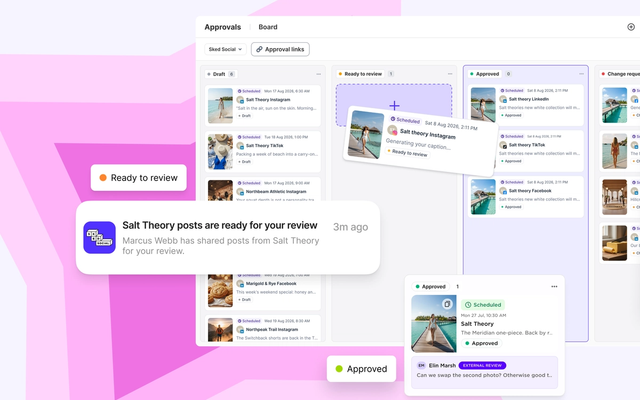
When you navigate to Approvals in Sked Social, posts appear as cards, grouped into columns by approval stage. At a glance, you can see everything across all your accounts: what's waiting for initial review, what's been sent back for changes, what's approved and ready to publish.
From the board, you can drag a card from one column to the next to update its status. A post moves from "pending review" to "approved" in a single drag. Click a card to see a full preview of the post: image, caption, formatting, exactly as it'll look when it publishes. Right-click for a quick-action context menu. Columns collapse when you've cleared a stage, so you can fold them up and focus on what still needs attention.
The old experience forced reviewers to scan a flat list row by row and mentally group posts by status. The Board makes the approval pipeline immediately legible and every action one step away. It's built for teams managing high volumes of content across multiple accounts, the kind of setup where an inbox-zero approach to approvals is actually achievable.
The Board is the default view when you navigate to Approvals, but Sked Social hasn't removed anything. The List view, Table view, and Calendar view are all still accessible via the view switcher, for teams who prefer a different format for specific tasks.
For client collaboration: Sked Social's external approval portal gives clients a direct link to review and approve content without creating an account. No signup friction on their end. The audit trail captures timestamps and actions, so you always know who approved what and when.
It works at franchise scale too. Spavia, a wellness franchise with 70+ locations, uploads a month of posts centrally, and each franchisee previews and approves them with a single click.
On plan availability: approvals, including no-login client approvals in Sked Social, are part of Accelerate (US$249 a month, or US$208 a month billed annually) and Custom. Accelerate includes six users and four approval statuses you can customize. The Approvals Board is included with every plan that has approvals, at no extra cost.
For agencies managing multiple client accounts, the integrated approach matters: approval and scheduling live in the same platform, so there's no handoff between approval tool and publishing tool.
Most agencies spend months in the wrong tool and assume the process is the problem. Usually it's the other way around. Now that the tool question is settled, the process is where the real work starts and where most agencies find out whether they're actually built to scale.
Common questions
Approval tool questions, answered
Which social media approval tools let clients approve without logging in?
Sked Social lets clients approve from a no-login review link on Accelerate and Custom. Sprout Social lets up to three external approvers approve from email prompts on its Advanced plan. Planable and Later let outside reviewers view and comment from a link, while formal approval happens with an account or inside the tool. In Hootsuite, a team member records a client's outside sign-off on the post.
Which approval tools keep an audit trail of every approval?
Sked Social logs every approval action with a timestamp and the person who took it. Sprout Social includes audit logging with its approval process, and Hootsuite keeps an approval history showing who sent, edited and approved each post. Whichever tool you pick, check that the record stays available after the post publishes, so you can settle a client question months later.
Can you set up custom approval stages for each client?
Yes, in most agency tools, with limits. Sked Social's Accelerate and Custom plans include four approval statuses you can customize, and posts publish only after the required approvals. Hootsuite allows up to three layers of approvers. Planable offers optional or required approval on Basic and Pro, and multi-level approval on Enterprise.
How much does Sked Social cost for client approvals?
Approvals, including no-login client review and the Approvals Board, are included in Accelerate at US$249 a month, or US$208 a month billed annually, with six users. They are also part of Custom plans. Grow does not include approvals.
Sked Social or Planable for agency approvals?
Planable is approval-first: strong previews and comment threads, priced per workspace, with formal approval through a free approver account. Sked Social puts approvals, scheduling, analytics and the inbox in one plan, and clients approve from a link without an account on Accelerate and Custom. If approvals are your only bottleneck, Planable is a fair pick. If you also want reporting and the inbox without per-client add-ons, Sked Social fits better.