En esta página
- Puntos clave
- Por qué los retrasos en las aprobaciones salen caros cuando hay mucho volumen
- Qué hay que tener en cuenta a la hora de evaluar las herramientas de aprobación
- Los tres tipos de herramientas de aprobaciones (y sus ventajas e inconvenientes)
- Comparativa de las principales herramientas
- Cómo gestiona Sked Social las aprobaciones en 2026
Puntos clave
- El 62,1 % de los equipos de marketing ya usa seis o más herramientas (MarTech, 2025): añadir otra herramienta de aprobación independiente empeora el problema, en lugar de mejorarlo.
- El acceso externo de los clientes sin necesidad de iniciar sesión ya es algo habitual en las principales herramientas; sin embargo, no lo es disponer de un panel de aprobaciones visual en el que puedas actuar de un vistazo. Esa diferencia es lo que distingue a una herramienta diseñada para el volumen de trabajo de una agencia de otra que solo tiene una casilla de aprobaciones.
- La pregunta correcta no es «¿qué herramienta cuenta con las aprobaciones necesarias?», sino «¿qué herramienta se ha diseñado pensando en cómo trabajan realmente las agencias a gran escala?».
El proceso de aprobaciones es donde la mayoría de las relaciones entre agencias y clientes se van desmoronando poco a poco. No de forma dramática, sino de esa manera en la que las publicaciones salen al aire con los precios del mes pasado, nadie encuentra el hilo en el que el cliente dijo que sí, y tu gestor de cuentas se pone a hacer de detective a las 9 de la mañana del lunes.
Para las agencias con menos de cinco clientes, casi cualquier herramienta sirve para salir del paso. Los problemas empiezan más adelante, de forma sutil, cuando el número de clientes supera un límite y los hilos de correo, las capturas de pantalla y las respuestas del tipo «¡Qué bien queda!» dejan de ser encantadores y empiezan a ser un lastre. Esta es una guía para elegir una herramienta que supere ese límite, para que puedas crear un proceso de Aprobaciones que también lo haga.
Por qué los retrasos en las aprobaciones salen caros cuando hay mucho volumen
Hay una relación directa entre un proceso de aprobaciones que no funciona y la capacidad de tu agencia para operar a gran escala. No se trata solo de la frustración, sino del coste acumulado del tiempo que se dedica a cosas que no deberían llevar tiempo.
Cuando las publicaciones están pendientes de aprobación en hilos de correo electrónico y mensajes de WhatsApp, los gestores de cuentas se pasan horas persiguiendo a los clientes en lugar de pensar estratégicamente. Cuando no hay una visión centralizada de lo que está pendiente, los jefes de equipo no pueden establecer prioridades. Cuando no hay un registro de auditoría, te pasas el tiempo reconstruyendo el historial en lugar de seguir adelante. Cuando el contenido aprobado está en una herramienta distinta a tu programador, cada publicación requiere un traspaso manual.
El 62,1 % de los equipos de marketing ya usa seis o más herramientas, según el informe «State of the Marketing Technology Stack 2025» de MarTech. Añadir otra herramienta de aprobación independiente no hace más que agravar el problema: más cambios de contexto, más inicios de sesión, más puntos en los que las cosas pueden fallar.
Las agencias que gestionan sin problemas a 15 clientes no es que se esfuercen más. Han creado un proceso que elimina las complicaciones en cada paso: un solo sitio para revisar, un solo enlace en el que los clientes tienen que hacer clic, una sola vista para saber en qué punto va todo.
Eso no es optimizar procesos por el simple hecho de hacerlo. Es una decisión estructural sobre qué herramientas deben formar parte de tu pila tecnológica.
Qué hay que tener en cuenta a la hora de evaluar las herramientas de aprobación
Antes de decidirte por cualquier herramienta, comprueba que cumple estos ocho criterios:
- Acceso de los clientes sin necesidad de iniciar sesión. Esto no es negociable. Pruébalo tú mismo: ¿puede un cliente hacer clic en un enlace y leer una publicación sin tener que registrarse en nada?
- Vista previa visual de la publicación. ¿El revisor ve la publicación, la imagen, el pie de foto y el formato tal y como son, y no solo el título o la descripción?
- Una visión general del proceso para todos los clientes. ¿Puedes ver todas las publicaciones pendientes de todas las cuentas de los clientes en una sola pantalla? ¿Se ve a simple vista el estado de cada publicación sin tener que hacer clic en cada una de ellas?
- Cambios de estado mediante «arrastrar y soltar». Poder pasar una tarjeta de «pendiente de revisión» a «aprobada» con solo arrastrarla es más rápido e intuitivo que tener que entrar en cada publicación y hacer clic en un menú desplegable.
- Registro de auditoría con marcas de tiempo. ¿La herramienta registra quién aprobó qué y cuándo? ¿Puedes consultarlo si surge alguna disputa?
- Gestión de varias cuentas. ¿Puedes gestionar varias cuentas de clientes de forma ordenada desde un único panel de control, con una separación clara entre ellas?
- Programación integrada. ¿Las aprobaciones y la Programación son la misma herramienta? ¿O vas a exportar el contenido aprobado a otro sitio?
- 8. Permisos y control de acceso. ¿Se pueden asignar diferentes niveles de acceso a los miembros del equipo, designar revisores específicos para cada cliente y controlar lo que cada persona puede ver y hacer?
No todas las herramientas obtendrán una buena puntuación en los ocho aspectos. El lugar en el que estés dispuesto a hacer concesiones depende de cómo esté organizada tu agencia, pero acceso de clientes externos y un vista del proceso visual son los dos que más cuentan en cuanto al volumen.
Los tres tipos de herramientas de aprobaciones (y sus ventajas e inconvenientes)
La mayoría de las herramientas de este ámbito se pueden clasificar en una de estas tres categorías. Saber qué tipo estás evaluando influye en cómo valoras las ventajas y desventajas.
Tipo 1: Plataformas completas de redes sociales con un sistema de aprobaciones integrado. Herramientas como Sked Social, Hootsuite y Sprout Social son plataformas completas de Programación y Analítica que incluyen un proceso de Aprobaciones. La ventaja: todo está en un mismo sitio. El contenido aprobado pasa directamente a la cola de Programación sin necesidad de ningún traspaso manual. El riesgo: la experiencia de usuario en el proceso de Aprobaciones a veces queda en un segundo plano en plataformas diseñadas principalmente para Programación y Publicación.
Tipo 2: Herramientas de colaboración en las que prima la aprobación. Herramientas como Planable están diseñadas específicamente para la revisión y aprobación de contenidos. Suelen tener interfaces visuales excelentes y el acceso para revisores externos integrado en el producto principal, además de que también realizan la programación y la publicación. La contrapartida se nota en los detalles: el conjunto de herramientas más amplio que necesitan la mayoría de las agencias (Analítica, Bandeja de entrada unificada, Escucha social) suele ser un complemento de pago o, simplemente, no está incluido, así que al final acabas complementándolo con otras herramientas de todos modos.
Tipo 3: Herramientas generales de gestión de proyectos adaptadas para las aprobaciones de contenidos. Algunas agencias usan Trello, Asana o Notion para gestionar las aprobaciones de contenidos. Funciona, más o menos, hasta que deja de hacerlo. Estas herramientas no se diseñaron para previsualizar publicaciones en redes sociales ni para que los revisores externos de los clientes tengan acceso, y las carencias se notan claramente cuando tienes que gestionar un gran volumen de trabajo con más de 10 clientes.
Para la mayoría de las agencias que gestionan 10 o más clientes, la verdadera elección está entre el Tipo 1 y el Tipo 2: una plataforma diseñada pensando primero en la Programación y a la que se le han añadido las aprobaciones, o una diseñada pensando primero en las aprobaciones y con una estructura más ligera y amplia. Ambas permiten la Publicación. La cuestión es con qué carencias puedes vivir.
Los argumentos a favor de una plataforma totalmente integrada se van acumulando con el tiempo. Tener las aprobaciones, la programación, la analítica y la Bandeja de entrada en un solo sitio significa que no hace falta añadir herramientas extra ni copiar contenido de una a otra. Si la revisión, la publicación y la generación de informes se gestionan todo en un mismo sitio, la diferencia se nota con 40 publicaciones a la semana.
Comparativa de las principales herramientas
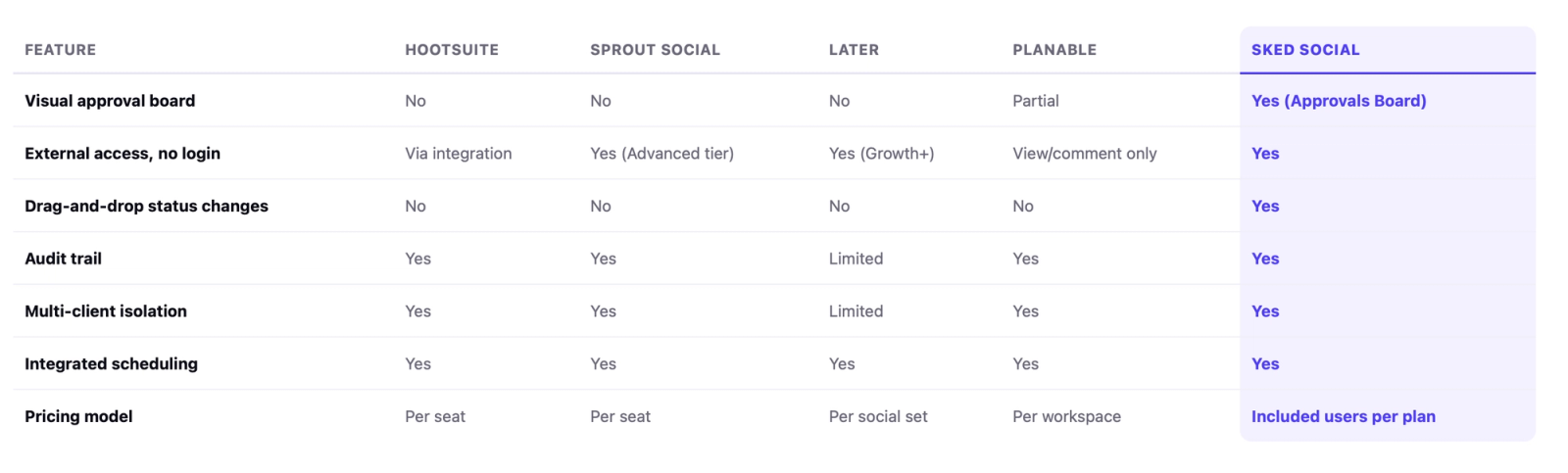
- Hootsuite: Los planes Advanced, Business y Enterprise incluyen funciones de aprobaciones, con revisores de varios niveles y un historial de aprobaciones que se puede exportar. Sin embargo, no hay un flujo de trabajo visual, y conseguir que los clientes aprueben sin tener que iniciar sesión en Hootsuite suele implicar integrar una herramienta de terceros en lugar de usar un portal integrado. El precio por usuario se dispara rápidamente para los equipos de agencias en expansión.
- Sprout Social: Un proceso de aprobaciones bien diseñado, con permisos basados en roles y un registro de auditoría sólido. Ofrece la posibilidad de aprobaciones externas sin necesidad de iniciar sesión, en la que los clientes verifican un correo electrónico y dan su visto bueno sin necesidad de tener una cuenta, pero solo en su nivel más alto, el «Advanced». Si a esto le sumas un precio por usuario que parte de una cifra elevada, una agencia de 10 personas con más de 20 cuentas de clientes acaba saliendo muy caro.
- Más tarde: Está pensada sobre todo para planificar contenido visual, y lo hace muy bien. Ha añadido las aprobaciones de contenido externo en su plan Growth y superiores, con un enlace para compartir que no requiere tener una cuenta de Later. Lo que no es es un sistema de agencia centrado en el volumen: la revisión se hace mediante enlaces y comentarios, en lugar de un tablero que se utiliza para muchos clientes, y el precio varía según el conjunto de redes sociales a medida que añades marcas.
- Planable: Diseñado específicamente para colaborar y revisar contenidos, con vistas previas muy claras de las publicaciones, hilos de comentarios por publicación, y la posibilidad de realizar programación y publicación en nueve plataformas. Hay un detalle que pilla desprevenidas a las agencias: los enlaces para invitados permiten que personas externas vean y comenten sin necesidad de iniciar sesión, pero para dar la aprobación definitiva, hay que invitar al cliente como miembro y que este inicie sesión (la cuenta es gratis, pero sigue siendo una cuenta). Además, la Analítica y la bandeja de entrada unificada son complementos de pago, no hay Escucha social en ningún plan, y el precio se calcula por espacio de trabajo (se recomienda un espacio por cliente), así que la factura sube con cada cuenta que añadas.
- Sked Social: Es el único aquí que cuenta con un panel visual de aprobación mediante arrastre (el nuevo «Approvals Board»), junto con una función de Programación integrada y un registro de auditoría completo. También ofrece la aprobación de clientes sin necesidad de iniciar sesión, incluida a partir del plan Accelerate, en lugar de estar limitada al plan más caro, como ocurre con Sprout. Accelerate tiene una tarifa plana de 199 $ al mes, independientemente del número de clientes que tengas, mientras que una configuración para cinco clientes en el plan intermedio de Planable ronda los 335 $ una vez que añades las funciones de Analítica y la Bandeja de entrada que Sked ya incluye. Disponible a partir del plan Accelerate.
Cómo gestiona Sked Social las aprobaciones en 2026
El enfoque de Sked en materia de aprobaciones se basa en la idea de que el proceso de aprobación no debería parecer una tarea administrativa. La última novedad en este sentido es el «Approvals Board», que se lanzó en junio de 2026 y que cambia por completo la percepción de todo el proceso.
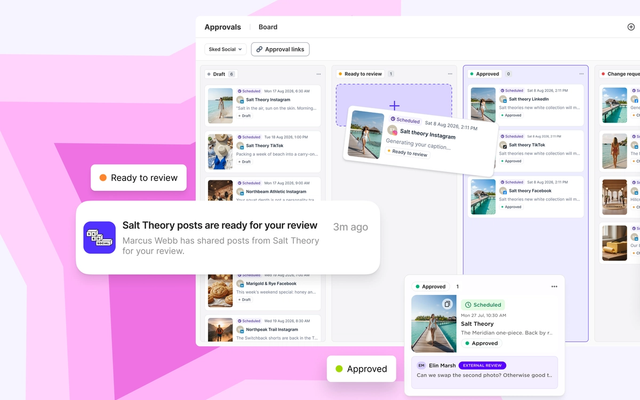
Cuando vas a la sección «Aprobaciones» en Sked, las publicaciones aparecen en forma de tarjetas, agrupadas en columnas según la fase de aprobación. De un solo vistazo, puedes ver todo lo que hay en todas tus cuentas: lo que está pendiente de revisión inicial, lo que se ha devuelto para que se hagan cambios y lo que ya está aprobado y listo para la publicación.
Desde el tablero, puedes arrastrar una ficha de una columna a otra para actualizar su estado. Una publicación pasa de «pendiente de revisión» a «aprobada» con un solo arrastre. Haz clic en una tarjeta para ver una vista previa completa de la publicación: imagen, pie de foto, formato… tal y como se verá cuando se publique. Haz clic con el botón derecho para acceder al menú contextual de acciones rápidas. Las columnas se ocultan cuando has completado una fase, así que puedes plegarlas y centrarte en lo que aún requiere tu atención.
Antes, tenías que revisar la lista plana fila por fila y agrupar mentalmente las publicaciones según su estado. El Panel hace que el proceso de aprobación sea fácil de seguir de un vistazo y que cada acción esté a solo un paso. Está pensado para equipos que gestionan grandes volúmenes de contenido en varias cuentas, el tipo de situación en la que realmente se puede conseguir mantener la bandeja de entrada a cero en lo que respecta a las aprobaciones.
El panel es la vista predeterminada cuando accedes a «Aprobaciones», pero Sked no ha eliminado nada. Las vistas «Lista», «Tabla» y «Calendario» siguen estando disponibles a través del selector de vistas, para los equipos que prefieran un formato diferente para tareas concretas.
Para colaboración con los clientes: El portal de aprobación externo de Sked ofrece a los clientes un enlace directo para revisar y aprobar contenidos sin necesidad de crear una cuenta. No hay que pasar por el lío de registrarse. El registro de auditoría recoge las marcas de tiempo y las acciones, así que siempre sabes quién aprobó qué y cuándo.
Sobre la disponibilidad del plan: las aprobaciones están disponibles en los planes Accelerate y Custom. El plan Accelerate incluye seis usuarios. El panel de aprobaciones está incluido en todos los planes con acceso a Aprobaciones, sin coste adicional.
Para las agencias que gestionan varias cuentas de clientes, lo importante es el enfoque integrado: la aprobación y Programación están en la misma plataforma, así que no hay que pasar el relevo entre la herramienta de aprobación y la de publicación.
La mayoría de las agencias se pasan meses usando la herramienta equivocada y dan por hecho que el problema está en el proceso. Normalmente es al revés. Ahora que ya tenemos clara la cuestión de la herramienta, El proceso es donde empieza el trabajo de verdad y donde la mayoría de las agencias descubren si realmente están preparadas para crecer. Te cuento que ahí es donde la mayoría de las agencias se dan cuenta de si realmente están preparadas para crecer.