On this page
- Key takeaways
- What is a social media approval process? (and how agency approvals differ)
- Who should approve social media posts before they're published?
- How do you set up a social media approval process for clients? (seven steps for 2026)
- Does every post need client approval? A risk-tiered approval matrix (template)
- How do you get clients to approve posts quickly without endless email chains?
- How many revision rounds should a client get? (cap at one or two)
- How long should client approval take, and how do you stop approvals stalling?
- How do you prove a client approved a social media post?
- What should agencies look for in a client approval tool?
- How Sked Social runs client approvals
Key takeaways
- A social media approval process is a fixed set of steps a post goes through between draft and publish: who checks it, in what order, against which checklist, and by when. For agencies, the client is the final approver.
- Run internal review first, then send the client one review link per batch, with one decision-maker, one deadline, and one place feedback lives. That single change replaces most approval email chains.
- At least two people should approve every post: an internal reviewer at the agency and one named decision-maker at the client. Add compliance or legal only when the risk tier calls for it.
- Cap client revisions at one or two rounds per post or batch, and write the cap into the statement of work.
- Not every post needs the same path. Tier content by risk, so routine posts move fast and regulated or paid posts get the extra checks.
- Sked Social's no-login review links, custom approval statuses, review reminders, and annotations on external review links are included on the Accelerate and Custom plans.
A social media approval process for agencies is the fixed set of steps every post moves through from draft to approved to scheduled. Each step has a named owner, a checklist, and a deadline, and the client signs off last. It replaces "looks good" replies with a clear, recorded yes before anything goes live.
Most agencies already have a process. It just lives in email chains, three versions of the same caption, and a client who edits the post after it was approved. This guide covers how to set one up for clients in seven steps, who belongs in the approval chain, how many revision rounds to allow, and how to keep proof of every sign-off.
What is a social media approval process? (and how agency approvals differ)
A social media approval process is the fixed set of steps a post goes through between draft and publish: who checks it, in what order, against which checklist, and by when. In an agency, the client is the final approver. Everyone before them is there to make sure the client sees a post that is already right.
The easiest way to picture it is as a status pipeline. Every post sits in exactly one of these stages:
- Draft. The creator is still working on it.
- In review. It's with a reviewer, internal or client.
- Changes requested. The reviewer wants edits, with specific notes.
- Approved. The final approver has said yes to this exact version.
- Scheduled. It's queued to publish at an agreed time.
- Published. It's live.
The point of the pipeline is that status is visible to everyone. A thumbs-up emoji in Slack or a "looks good" reply on email is not a sign-off. It doesn't say which version was approved, it isn't attached to the post, and nobody else on the team can see it. When a client later asks why a post went out, a reaction in a chat thread is a weak answer.
What are the four types of approval process?
Most approval setups fall into one of four patterns:
- Centralized. One person or team reviews everything. It suits a small agency with a single account lead per client.
- Hierarchical (multi-step). Posts pass through several reviewers in order, such as creator, account manager, then client. It suits agencies with junior creators or high-volume clients.
- Collaborative (external). The client and other outside stakeholders review in a shared space alongside the agency team. This is the standard agency model.
- Automated with a human check. Tools route posts, send reminders, and flag what's waiting, while a person still makes the final call. Automation moves the post along. It never approves it.
How do agency approvals differ from in-house approvals?
In-house teams answer to their own leadership. Agencies answer to someone outside the building. That changes three things: the final approver works for a different company, you're running the same process across several clients at once, and revision limits are usually written into a contract. If you're on a brand team rather than an agency, our guide to setting up an internal approval process for in-house teams is the better fit.
In Sked Social, posts carry their status across the calendar and the Approvals Board, which groups posts by approval status. The Grow plan has two fixed post statuses. Accelerate and Custom include four out of the box, plus customizable statuses you can shape around each client's approval chain.
Who should approve social media posts before they're published?
At least two people should approve every agency post before it's published: an internal reviewer at the agency (usually the account manager or creative lead) and one named decision-maker at the client. Compliance or legal joins only when the post's risk tier needs it, such as regulated claims or creator content. The creator drafts but never approves their own work.
Every approval chain needs clear roles. The most common failure isn't a bad post. It's two people who both think the other one approved it. Write down who does what before the first post goes to review.
Here's a typical agency-client approval chain:
| Role | What they check | Can edit | Can approve |
|---|---|---|---|
| Content creator | Brief, copy, visuals, platform format | Yes | No |
| Internal reviewer (account manager or creative lead) | Brand fit, accuracy, checklist, strategy | Yes | Yes (internal step) |
| Client approver | Message, offer, brand, timing | No (comments only) | Yes (final) |
| Backup client approver | Same as client approver, when the primary is away | No (comments only) | Yes (final) |
| Compliance or legal (only when the risk tier needs it) | Claims, disclosures, regulated language | No (comments only) | Yes (for that step) |
Four rules that keep the chain honest
- The creator is never the sole approver. A second pair of eyes catches what the writer reads past.
- Separate editing from approving. Clients comment and request changes. Your team makes the edits. When clients edit directly, you lose track of which version was approved.
- Cap approvers at two or three per post. Every extra reviewer adds a day and another opinion. More reviewers rarely means fewer mistakes.
- Name one client decision-maker. If three people at the client can approve, nobody is accountable for the final yes.
A light RACI for a small agency
RACI stands for responsible, accountable, consulted, and informed. Picture a five-person agency running eight clients (a hypothetical example). The creator is responsible for drafting. The account manager is accountable for the internal sign-off and for getting the batch to the client on time. The client's marketing manager is the one accountable approver on their side, and their product lead is consulted only on launch posts. The agency owner is informed through a weekly status view. Nobody else touches the approval.
That last line matters. A clear "informed" list stops people dropping into review threads with late opinions.
Permissions should match the roles. In Sked Social, user permissions and team collaboration tools control which social accounts each team member can access, on Grow, Accelerate, and Custom. Grow includes three users and Accelerate includes six. On Accelerate and Custom, external client reviewers don't take a seat at all, because they approve through a review link instead of logging in.
How do you set up a social media approval process for clients? (seven steps for 2026)
To set up a client approval process, assign named roles, decide which posts need client sign-off, batch content backward from publish dates, review internally before sending one link to the client, check every post against a shared checklist, lock and schedule approved posts, and agree review windows with reminders and an escalation rule. Each step is short on purpose. The aim is a process your team will actually follow on a busy Thursday.
1. Assign the roles
Use the roles table above. Name the creator, internal reviewer, client approver, and backup approver for every client. Put the names in the client's kickoff agreement so nobody has to ask later.
2. Decide what needs client approval
Not every post needs the client. Sort content into risk tiers (see the approval matrix in the next section). Routine posts from an approved template may only need internal review. Campaign, paid, and regulated posts always go to the client.
3. Batch content and work backward from publish dates
Plan a week or a month at a time on your content calendar. Start from each publish date and count back: publish date, scheduling, client review, internal review, creation. If a post goes live Friday, the client sees it by Wednesday. A social media content calendar built around those dates stops last-minute requests from becoming the norm.
4. Review internally, then send one link to the client
Your team reviews first. The client only sees work that is already on brief. Send the whole batch in a single review link, not one email per post. With Sked Social approvals on Accelerate and Custom, drafts can be sent for approval before they're scheduled, and clients review through a review link without needing a Sked Social account.
5. Review against a pre-publish checklist
Every reviewer uses the same checklist, so feedback stays consistent from post to post. Copy this one into your process doc:
                Pre-publish checklist
[ ] Brand voice: does it sound like the client, not like us?
[ ] Copy accuracy: names, prices, dates, offers, and spelling checked
[ ] Visuals: correct crop and format for each platform (feed, Reels, Stories, TikTok)
[ ] Hashtags: relevant, not banned, within the client's agreed set
[ ] Links: working, correct destination, UTM tags added
[ ] Tags and mentions: right handles, permission to tag where needed
[ ] Alt text: written for every image
[ ] Legal and IP: music, images, and quotes are licensed or owned
[ ] Disclosure: creator and partner content clearly labeled
[ ] Timing: publish time and accounts match the plan
6. Approve, lock, then schedule
Once the client approves, treat the post as locked. Schedule it. If anyone changes the copy, the asset, a link, or the timing after sign-off, it goes back for re-approval. Small edits after approval are how the wrong version ends up live.
7. Set review windows, reminders, and an escalation rule
Agree on a review window for each tier, send automatic reminders, and decide who steps in when the client goes quiet. More on this in the turnaround section below.
A week in practice (hypothetical)
Monday, the team batches next week's posts. Tuesday, the account manager reviews them internally. Wednesday morning, the client gets one review link. Thursday, the team works through any changes. Friday, approved posts are locked and scheduled. On Accelerate and Custom, Sked Social lets you set up custom approval statuses for each step, such as internal review, legal, and client, and posts only publish once the required approvals are in.
Does every post need client approval? A risk-tiered approval matrix (template)
No. Routine, low-risk posts (evergreen content from a client-approved template, comment replies within agreed guidelines) can skip client review. Campaign, paid, creator, and regulated posts should always go to the client, and some need compliance review as well.
Sending every post through the same approval chain wastes everyone's time. A comment reply doesn't need the same scrutiny as a paid launch ad. A risk-tiered approval matrix tells your team which path each type of content takes.
Copy this template and adjust it per client. The review windows are Sked Social's own guidance, not industry statistics.
| Content type | Risk tier | Internal reviewer | Client approval | Compliance or legal | Recommended review window |
|---|---|---|---|---|---|
| Evergreen and recurring posts | Low | Account manager | Only until the template is signed off | No | 24 hours |
| Campaign and launch posts | Medium | Account manager and creative lead | Yes | Only if claims are made | 48 to 72 hours |
| Paid or boosted posts | High | Account manager | Yes | If the offer or claims need it | 48 to 72 hours |
| Creator and influencer content | High | Account manager | Yes | Yes, for disclosure | 48 to 72 hours |
| Regulated claims (finance, health) | High | Account manager | Yes | Yes | Per the client's compliance calendar |
| Reactive and crisis posts | Variable | Senior lead | Named fast-lane approver | If the topic needs it | Same day, through the fast lane |
| Comment replies | Low | Community manager | No, follow the agreed reply guidelines | Escalate sensitive threads | Within your response time target |
Templates can skip the queue
Recurring formats, like a weekly tip post or a monthly roundup, can skip client review once the client signs off on the template. Agree on what can change without re-approval (the tip itself) and what can't (the layout, offer, or call to action).
Regulated clients need their own path
Financial services is the clearest example. FINRA Rule 2210 requires a registered principal to approve retail communications before use. Posts on interactive forums are an exception when the firm supervises and reviews them the same way it handles correspondence. FINRA has also proposed changes. Regulatory Notice 26-14, published July 9, 2026, would remove the distinction between interactive social media and other communications, and replace blanket principal pre-use approval with risk-based written procedures. That proposal's comment period closed on September 11, 2026. It is proposed, and it is not yet filed with or approved by the SEC, so keep following the current rule.
Creator content has its own rules too. Under the FTC's Endorsement Guides, revised in 2023, "advertisers need to have reasonable programs in place to train and monitor members of their network." The FTC also says responsibility for clearly disclosing a material connection rests with the influencer and the brand. That's why creator posts sit in the high tier with a disclosure check.
In Sked Social, Brand Kit labels (your content pillars) let you tag posts by type, and the Approvals Board can filter by label and post type so each tier is easy to find. Single-post approval on Accelerate and Custom handles the one-off high-risk post that can't wait for the weekly batch.
How do you get clients to approve posts quickly without endless email chains?
Set the rules at kickoff, before the first post exists. Agree on one client decision-maker plus a backup, one review link per batch, one deadline, and one place feedback lives, then add a default action for missed deadlines and a cap on revision rounds. Clients approve faster when they review a whole batch in one sitting, in one link, against a date they agreed to.
The kickoff agreement and a short Welcome Kit are where those rules get written down. Here's what each rule prevents:
- One decision-maker plus a backup. Stops conflicting feedback from three people at the client, and stops approvals freezing when someone goes on leave.
- One review link. Stops feedback arriving across email, Slack, and phone calls.
- One deadline. Stops "we'll get to it" from becoming a missed publish date.
- One place feedback lives. Every comment sits on the post it's about, where the whole team can see it.
- A default action at the deadline. Agree on what happens if the client doesn't respond. Common choices are holding the post or moving it to the next slot. Pick one and write it down.
- A revision cap. One or two rounds, covered in the next section.
Example statement of work clause
This is an example only, not legal advice. Have your own counsel review anything you put in a contract.
"The Client will nominate one approver and one backup approver. The Agency will share content for review in a single review link each week. The Client will approve or request changes within two business days. If no response is received by the deadline, the affected posts will be held and rescheduled to the next available slot. Each batch includes up to two rounds of revisions. Further changes will be handled as a new change request."
What goes in the Welcome Kit
The Welcome Kit turns the agreement into something the client actually reads. Keep it short and plain:
- Meet the team. Names, roles, and photos of the people the client will work with, and who to contact for what.
- Project overview and timeline. Goals, scope, the posting schedule, and when each batch arrives for review.
- Style and brand guidelines. Voice, visual rules, colors, fonts, and anything the client never wants to see.
- Success metrics and reporting cadence. What you'll measure and when the client gets a report.
- FAQs. How review links work, what counts as a revision round, and what happens at the deadline.
Have the client sign the kit and return it. When a dispute comes up six months later, you'll both have the same page to point to.
One more habit worth agreeing on at kickoff: batch client review into one session a week. One focused review beats 20 separate requests landing on a busy marketing manager. On Accelerate and Custom, Sked Social's external review links let clients preview, comment, and approve without a Sked Social account, and shared calendars give external stakeholders a view of what's coming.
How many revision rounds should a client get? (cap at one or two)
Most agencies should cap client revisions at one or two rounds per post or batch, written into the statement of work. That's Sked Social's recommendation, and it holds up for a simple reason. When clients know rounds are limited, they consolidate their feedback and send it in one go.
Endless revisions cost more than time. Each round pushes back the publish date, drains the creative team, and makes the calendar slip. A cap might feel counterintuitive, like you're giving clients less. In practice, clearer rules make feedback more thoughtful and the relationship more respectful. Clients value your time when the agreement shows that you value it too.
What counts as a round?
Define it in the kickoff agreement so there's no argument later. A round is one consolidated set of feedback on a post or batch, followed by one set of changes from your team. These don't count as a new round:
- Fixing your own errors, like a typo or a wrong link.
- Answering a clarifying question.
- Changes your team needed after internal review.
These do count:
- A new set of client changes after you've delivered the revised version.
- A change of direction, such as a new offer, new visuals, or a new angle.
What happens past the cap?
Spell it out. The two common options are a paid change request at an agreed rate, or a new brief that goes back into the next batch. Either works. What doesn't work is quietly absorbing round four and five, because the client learns the cap isn't real.
Make the cap workable
A cap only works when feedback is consolidated and specific. Put every comment in a single review link, ask the client to review the whole batch in one sitting, and give them a deadline. Vague notes like "can you tweak it" burn rounds without moving the post forward. Pinned, precise feedback fixes that.
In Sked Social, Annotations & Highlights let reviewers drop numbered pins on images, video, and every page of a PDF carousel, and highlight specific caption text with a comment attached. Your team can resolve each pin as the change is made. Internal markup is available on all plans. Annotations on external review links are available on Accelerate and Custom. When a client requests changes with annotations but no written comment, Sked Social adds an automatic plain-English summary of the feedback, so nothing gets lost in translation.
How long should client approval take, and how do you stop approvals stalling?
As guidance, plan for 24 to 48 hours on routine posts, and longer for campaign or regulated content. These are working windows, not industry benchmarks. What matters most is that the window is agreed, written down, and enforced.
Why do approvals stall?
Most stalled approvals come down to four causes:
- Unclear final authority. The client team isn't sure who gets the last word, so nobody gives it.
- Too many approvers. Every extra reviewer adds time and another set of opinions.
- No deadline. Without a date, review drops to the bottom of the client's list.
- The approver is away. Leave, travel, or a busy launch week, with no backup named.
How to fix each one
- Set review windows by tier. Use the approval matrix. Routine posts get a short window, regulated posts follow the compliance calendar.
- Automate reminders. Nobody enjoys sending "just a nudge" emails. Let the tool do it on a schedule.
- Name a backup approver. If the primary approver is out, the backup approves. No exceptions.
- Agree on a default action at the deadline. Hold the post or move it. Decide at kickoff, not in the moment.
- Create a fast lane for reactive posts. Breaking news, a crisis, or a trend that won't wait gets a named fast-lane approver who can say yes the same day. Review the post with the full chain afterward, so the fast lane doesn't become the default lane.
Make waiting visible
The other fix is visibility. If the account manager can see at a glance which posts are waiting, and on whom, chasing becomes a two-minute job. The Approvals Board in Sked Social shows posts as cards grouped by approval status, so a stuck post is obvious. You can drag cards between columns to update status and filter by post status, post type, or label.
Sked Social also handles the nudging. On Accelerate and Custom, you can add reviewer emails to a review link so they're notified when posts are ready, then turn on review notifications and reminders for each reviewer. Reminders run Daily or Weekly at a time and timezone you choose. They stop once that reviewer has finished reviewing, so nobody gets nagged about posts they've already approved.
How do you prove a client approved a social media post?
Keep a sign-off record on the post itself that shows the approved caption, the exact assets, the scheduled time and accounts, who approved it, when, and every comment along the way. Sooner or later a client will ask, "Did we approve this?" The answer should take seconds to find, not an afternoon of digging through inboxes.
A good record shows six things:
- The final caption, exactly as it was approved.
- The exact assets, including the version of each image or video.
- The scheduled time and accounts the post was approved for.
- Who approved it, by name.
- When they approved it, with a date and time.
- Every comment and change request along the way.
Lock after approval
The record only means something if the post stays the way it was approved. Lock it once the client signs off. Any material change to the copy, an asset, a link, or the timing goes back for re-approval. That includes "tiny" changes like swapping one image in a carousel or moving the publish date. If the client didn't see it, they didn't approve it.
Why it matters
There are three practical reasons to keep a proper record:
- Client disputes. When a post underperforms or draws complaints, a record settles what was agreed without a blame conversation.
- Staff changes. When an account manager leaves, the history stays with the post, not in their inbox.
- Regulated audits. Clients in financial services, health, and other regulated industries may need to show who approved what, and when.
Keep the record on the post
Screenshots in a shared folder don't work. They're easy to lose, hard to search, and don't prove which version was live. The record should sit on the post itself, so anyone on the team can open the post and see its whole history.
In Sked Social, the external collaboration portal keeps an audit trail of approval actions. Each post also has an activity list that shows comments, status changes, and annotations in one chronological feed. Internal comments are available on all plans, and on Accelerate and Custom you can keep internal notes separate from the comments your client sees. So your team's creative notes stay private, and the client-facing history stays clean.
What should agencies look for in a client approval tool?
The best social media tools for agency client approval let clients review without a login, support multi-step approval statuses, send automatic reminders, capture pinned feedback on the post, and keep an audit trail of who approved what. Check how each tool counts client reviewers against your seat limit, too.
A quick checklist to run any tool against:
- Client access. Can clients approve from a link, without creating an account?
- Multi-step chains. Can you add internal, legal, and client steps, and block publishing until all are done?
- Reminders. Does the tool chase reviewers on a schedule, and stop once they're done?
- Precise feedback. Can reviewers pin comments to an image, video frame, or caption line?
- Proof. Is every approval logged with a name and timestamp on the post?
- Batch view. Can you see every waiting post across clients in one place?
For a side-by-side look at how tools handle these, see our comparison of social media tools with approval features and our roundup of the best social media management tools for agencies.
How Sked Social runs client approvals
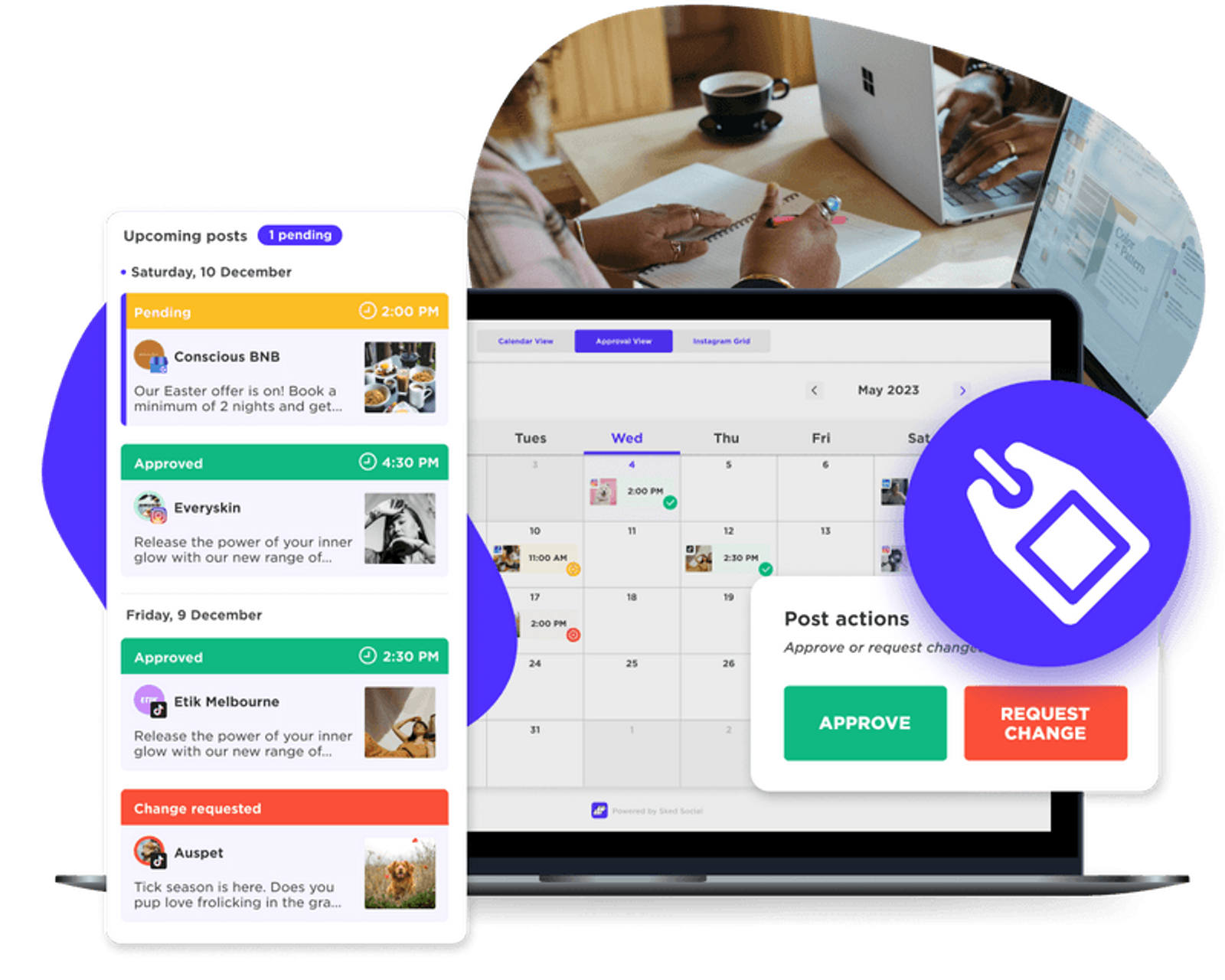
Everything above works on paper. The difference a tool makes is that the process happens in one place, without anyone having to police it by email. Sked Social is built for agencies that manage multiple clients, and Sked Social for agencies brings client approvals, scheduling, and reporting into one workspace.
Here's how the process maps to the product. Plan availability is noted for each.
- Drafts sent for approval. On Accelerate and Custom, posts can be submitted for approval instead of going straight to the schedule, and they only publish once the required approvals are in.
- Custom approval statuses. Grow has two fixed post statuses. Accelerate and Custom include four out of the box, plus customizable statuses for multi-step chains such as internal review, legal, and client.
- No-login external review links. On Accelerate and Custom, clients review in a review portal, see post previews, comment, and approve without a Sked Social account.
- Approvals Board. One view of every post grouped by approval status, with drag-and-drop status changes and filters by status, post type, and label. Included on Accelerate and Custom.
- Review notifications and reminders. On Accelerate and Custom, reviewers get an email when posts are ready and Daily or Weekly reminders until they're done.
- Internal and external comments. Internal comments on all plans. External comments for clients on Accelerate and Custom.
- Annotations & Highlights. Pins on images, video, and PDF carousel pages, plus caption highlights. Internal markup on all plans, and on external review links for Accelerate and Custom.
- Audit trail. A record of approval actions on the external portal, plus an activity list on every post.
- Shared calendars and single-post approval. Both on Accelerate and Custom.
Grow includes three users and Accelerate includes six. On Accelerate and Custom, your clients approve through review links, so they don't need seats of their own. You can see how it fits together on the Approvals feature page, and plan a full month on the scheduling calendar.
The approval process is where agencies lose the most time for the least return. Fix the rules first, then let the tool hold the line. Ready to try it with a real client batch? Start 14-day free trial. No credit card required.
Common questions
Frequently asked questions
What is a social media approval process?
A social media approval process is the fixed set of steps a post goes through between draft and publish: who reviews it, in what order, against which checklist, and by when. In an agency, the internal team reviews first and the client gives the final approval before the post is scheduled.
Who should approve social media posts before they are published?
At least two people: an internal reviewer at the agency, usually the account manager or creative lead, and one named decision-maker at the client, with a named backup for when they're away. Add compliance or legal only for regulated claims, paid offers that need it, or creator content that needs a disclosure check. The creator should never be the sole approver.
How do I get clients to approve social media posts faster without endless email chains?
Send each client one review link per batch instead of one email per post, name one decision-maker and a backup, and agree on a review deadline and a default action (hold or reschedule) if it's missed. Automatic reminders and pinned comments on the post itself remove most of the back-and-forth.
How long should client approval take?
As a working guide, allow 24 to 48 hours for routine posts and 48 to 72 hours for campaign or paid content. Regulated content follows the client's compliance calendar. Agree on the window at kickoff, along with what happens if the client misses it.
How many revision rounds should a social media client get?
Cap revisions at one or two rounds per post or batch, and write the cap into the statement of work. Define a round as one consolidated set of client feedback followed by one set of changes. Further changes become a paid change request or a new brief.
Do clients need a login to approve social media posts?
Not with Sked Social. On the Accelerate and Custom plans, clients review posts through an external review link, where they can preview, comment, annotate, and approve without creating a Sked Social account.
What should a social media approval checklist include?
Check brand voice, copy accuracy, visuals and platform crop, hashtags, links and UTM tags, tags and mentions, alt text, legal and IP rights, disclosure for creator content, and the publish time and accounts. Every reviewer should use the same checklist.
How do you document client approval of social media posts?
Keep the record on the post itself, not in screenshots. It should show the final caption, the exact assets, the scheduled time and accounts, who approved it and when, and every comment and change request. Lock the post after approval and send any material change back for re-approval.
What should agencies look for in a social media approval tool?
Look for no-login client review links, multi-step approval statuses that block publishing until every step is done, scheduled reviewer reminders, pinned feedback on images, video, and captions, and an audit trail with names and timestamps. Also check whether client reviewers count against your seat limit.
What's the difference between an agency approval process and an in-house one?
An agency's final approver works for a different company, the same process runs across several clients, and revision limits are usually set in a contract. In-house teams answer to their own leadership, so the chain is shorter and contracts rarely come into it.