On this page
- Key Takeaways
- Brand page or a new location page: pick your launch model
- Before the location's page goes live: a pre-launch checklist
- The first nine posts for a new location
- Sign-off without slowing the opening
- Don't forget the new location's Google Business Profile
- Launching a single business? Three first-post ideas
- After launch: what to report in the first month
- Common new-location launch mistakes
- Transform your social media management with Sked Social
Key Takeaways
- A business's first Instagram post should say who you are, where to find you, and why someone should follow. Clarity beats polish.
- For a new location, plan the first nine posts, not just the first one: teasers before opening, the opening day itself, and the posts that turn first visitors into regulars.
- Decide who writes and who approves each launch post before the countdown starts. Head office owns the brand. The location owns the local detail.
- Set up the new location's Google Business Profile early. In BrightLocal's 2026 survey of 1,002 US consumers, 47% said they won't use a business with fewer than 20 reviews.
- On the Accelerate and Custom plans, Sked Social approvals let reviewers check launch posts from a no-login link, and a shared, read-only calendar shows stakeholders the whole opening plan.
A business's first Instagram post has three jobs. Say who you are, show where to find you, and give people a reason to follow.
One clear photo or short video, a caption that introduces the business in two or three sentences, and a single call to action is enough. It doesn't need to be perfect. It needs to be clear.
For a group opening its fifth or fifteenth location, the first post is never just one post. It's the opening move in a short launch plan: a few weeks of teasers, an opening-day post, and the posts that follow while the doors are new. Head office and the location both have a stake in every one of them, so the plan also needs an owner, a sign-off rule, and a calendar everyone can see.
This guide covers both. Most of it is written for multi-location brands and franchise groups announcing a new location. That means adding a location, not moving one.
If you're relocating, you need a "we've moved" notice, not a launch plan. If you're launching a single business, the three first-post ideas further down are for you.
Brand page or a new location page: pick your launch model
Before anyone writes a caption, decide where the new location will live on Instagram. Give a new location its own Instagram account only if someone there can keep it active, every week, long after opening. Otherwise, announce it from the brand account. Either way, head office keeps admin access, and every location gets its own Google Business Profile.
There are two models, and most groups end up using a mix.
Model one: announce on the brand account. The new location gets its moment on the main brand page, and there's no separate profile. This works when your locations share one audience, when the brand is stronger than any single site, and when nobody on the ground will have time to post every week. It's also the safer choice for groups with high staff turnover, because there's no orphaned page to clean up when a manager moves on.
What it needs: local detail in every launch caption (the street, the suburb, the opening date), and a location tag on every launch post. People who tap that place then see the post alongside everything else tagged there. It also needs a simple way for the new team to send photos and stories to head office.
Model two: open a page for the location. Each location gets its own profile, run day to day by someone on site, inside rules set by head office. This works when every location has its own community. Restaurants, gyms, salons, hotels, and clinics usually fit, because regulars follow the place they actually visit. It also suits locations that run their own events, menus, or offers.
What it needs: a naming standard for the handle, a bio pattern, clear rules on who has access, and a plan for the page when the person who runs it leaves.
The hybrid. Plenty of groups do both. This is the hub-and-spoke model: the brand account is the hub and the location pages are the spokes. Head office supplies the brand content, and each location adds the local layer.
The brand account makes the big announcement and the location page carries the day-to-day posts after opening. If you go hybrid, decide which account posts first, and make sure the brand post points people to the new local page.
Not sure which model fits? Ask four questions:
- Will someone at the location post at least weekly, six months from now?
- Do customers think of this place as "theirs", or as one branch of a brand?
- Will the location run anything local, like events, specials, or community partnerships?
- Can head office see and approve what a location page publishes?
If you answer yes to most of these, a location page earns its keep. If not, launch on the brand account and revisit later. Our guide to Instagram for franchises weighs up separate accounts in more depth, and our franchise social media guide covers the wider hub-and-spoke structure. Once you're live, these Instagram location tag ideas show how to get more from the place tag.
Before the location's page goes live: a pre-launch checklist
A new page with no posts still gets visitors. Staff will look it up, local press might link to it, and curious neighbors will find it from the coming-soon signage. Get the profile right before the first post goes out.
- Switch to a professional account. Instagram recommends business accounts for retailers, local businesses, brands, and organizations. In the app, go to your profile, open the menu, choose Account type and tools, then Switch to professional account. Pick a category and choose Business. If the account was private, switching makes it public.
- Follow the naming standard. Use the handle and display name pattern from your brand standard, for example the brand name plus the suburb or city. Check the handle is free well before opening day, and register it early so nobody else takes it.
- Write the bio to the brand pattern. Say what the place is, where it is, and when it opens. Swap the opening date for opening hours once you're trading. Our eight-step Instagram bio audit is a good final check.
- Add contact details and the address. During setup, Instagram asks for business contact details, and you can choose whether they display on the profile. For a physical location, show them.
- Check the place exists to tag. Search for the new address in Instagram's location search. If it doesn't show up yet, sort it out before opening day, so the launch posts can carry the right location.
- Set the link in bio. Point it at the location's own page on your website, its booking page, or its menu. Not the brand homepage.
- Build the standard highlight set. Head office should supply covers and a fixed set, for example Opening, Menu or Services, Find us, and Reviews. The location fills them with local content.
- Decide who has access. At least two people should be able to get into the account, and one of them should sit at head office. A page that only opens on the manager's personal phone is a page you'll lose.
- Plan what to pin. Instagram lets you pin up to three posts to the top of a profile. Decide now which launch posts will sit there for the first month.
Run the checklist two to three weeks before opening, not the night before. Most of these steps take minutes, but the ones that depend on other people, like a handle claim or a missing location, can take days.
The first nine posts for a new location
The "first nine posts" idea comes from small-business advice: plan the first full grid so a new profile looks finished from day one. It adapts well to a location launch. Here's a sequence that covers the run-up, the day itself, and the first weeks of trading, with who writes each post and who approves it.
| # | Post | When | Written by | Approved by |
|---|---|---|---|---|
| 1 | Coming soon | 3 to 4 weeks before opening | Head office | Location manager (local facts) |
| 2 | The fit-out or the team | 2 to 3 weeks before | Location | Head office |
| 3 | Opening date | Once the date is locked | Head office | Location manager |
| 4 | Opening day | On the day | Head office template, location photos | Head office, in advance |
| 5 | Meet the manager | Opening week | Location | Head office |
| 6 | Local tie-in | Weeks 1 to 2 | Location | Head office |
| 7 | First customers, reshared | Weeks 1 to 3 | Location | Head office (reposting rules) |
| 8 | Opening offer, if the brand runs one | Opening week | Head office | Head office (and legal, if needed) |
| 9 | Find us | Week 1, then pinned | Location | Head office |
What goes into each one:
- Coming soon. A clear image of the site, the signage, or the brand in its new setting, plus the suburb and a rough timeframe. Example caption: "Something new is coming to Main Street. Our Brighton doors open next month. Follow along for the opening date."
- The fit-out or the team. Behind the scenes beats a render. Show the build, the first delivery, or the new team in training. The location shoots it. Head office checks it's on brand.
- Opening date. Only post a date once it's locked. A moved opening date costs more trust than a vague one. Include the address and the time.
- Opening day. Head office writes and approves the caption in advance. The location swaps in a real photo from the morning. Nothing else changes on the day.
- Meet the manager. A face and two lines on why they're excited about the neighborhood. Locals follow people, not logos.
- Local tie-in. A neighboring business, a local supplier, a school, or a sports club. The location knows who matters locally. Head office checks any partner rules.
- First customers, reshared. Ask before you repost anyone, and credit them. Follow the brand's reposting policy.
- Opening offer. Only if the brand runs one. Head office writes it, because offer terms are where improvised captions get groups into trouble.
- Find us. Address, parking, public transport, hours, and how to book. Pin it.
On every one of these posts, add the new location as the location tag. You can add it in Instagram, or in Sked Social when you create the post, along with the caption, hashtags, and first comment. If a post goes out without it, Instagram lets you add or edit the location on a post you've already shared.
Sign-off without slowing the opening
Launch posts fail in two directions. Head office writes everything and the captions get the local detail wrong. Or the location posts freely and the opening offer goes out with the wrong terms. The fix is a sign-off rule that matches each post to the person who knows the most about it.
There are two directions, and you'll use both:
- Head office writes, the location approves. For brand-heavy posts like the coming-soon teaser, the opening date, and the offer. The location manager's job is to check the facts: the street name, the date, the hours, the parking.
- The location proposes, head office approves. For local posts like meet the manager, the local tie-in, and reshared customer posts. Head office checks brand fit, tone, and anything with legal weight.
Then set three rules before the countdown starts:
- One final approver per post. Several people can comment. One person says yes.
- A content lock date. All nine posts drafted and approved at least a week before opening day. Late changes happen, but they should be the exception.
- A day-of rule. On opening day the caption is already approved. Only the photo changes.
Put every launch post on one calendar that head office, the regional manager, and the location can all see. When everyone looks at the same plan, nobody asks "is the opening post going out today?" in three different chats. If you're running openings across a franchise network, the franchise guide linked earlier covers how to set these rules for franchisees.
This is where a scheduling tool earns its place. In Sked Social, all launch posts sit on the same content calendar as the rest of your content.
On the Accelerate and Custom plans, Sked Social approvals add internal approval statuses and external review links. A location manager or a franchisee can review posts, comment, and approve from a no-login link. On those plans, a shared calendar also gives stakeholders a read-only view of the whole opening plan, without an account.
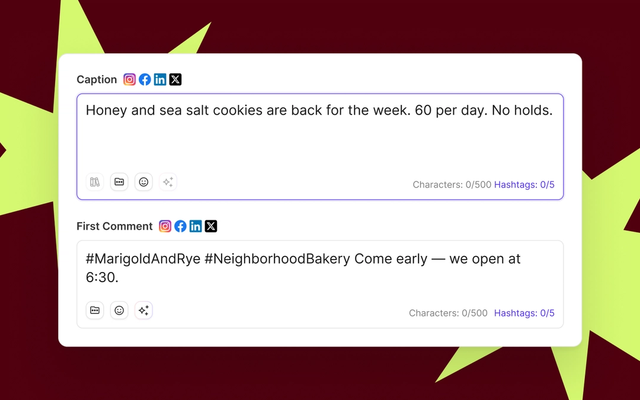
One more practical tip: keep launch captions clean. Sked Social can post an automatic first comment on Instagram, so hashtags can sit there instead of crowding the caption.
Don't forget the new location's Google Business Profile
For a physical location, Instagram is only half the launch. Plenty of people will look the new location up on Google before they ever find its Instagram page, and a brand-new location starts there with no reviews and no posts.
Start early. Google asks you to verify a business before you can change its details or interact with customers, and Google says verification reviews take up to five business days, occasionally longer. Build that into the countdown, so the profile is verified before the coming-soon post goes out.
Once the profile is live, use it the same way you use the Instagram launch:
- Updates for the coming-soon news, the opening date, and the opening-day post.
- Events for an opening day or a launch event.
- Offers for the opening offer, if the brand runs one.
Google Business Profile supports all three post types. The same content plan can feed both channels, with captions rewritten for search. That means fewer emojis, more facts, and the address and hours up front.
Reviews matter even more than posts for a new location, and they're the one thing you can't schedule. In BrightLocal's 2026 Local Consumer Review Survey of 1,002 US consumers, 47% said they won't use a business that has fewer than 20 reviews. And 74% said they only care about reviews written in the last three months.
A new location has zero. So asking early customers for a review belongs in the opening plan, right next to the find-us post.
Responding matters too. In the same survey, 89% of consumers said they expect business owners to respond to reviews. But generic, templated replies made 50% of consumers unlikely to choose a business. Write replies that sound like a person at that location, and mention something specific from the review.
Sked Social supports Google Business Profile alongside Instagram. You can schedule Google posts on the same calendar as the rest of the launch, and reply to new reviews from the same inbox as Instagram comments and messages. Sked Social can also suggest an AI reply to a review, so a team member can start from a draft and then make it specific. For the full setup, read our Google Business Profile guide.
Launching a single business? Three first-post ideas
If you're launching one business rather than a new location, the plan is simpler, but the audience is real. Half of US adults say they use Instagram, and 80% of 18 to 29 year olds do, according to Pew Research Center's survey of 5,022 US adults, fielded February to June 2025.
The same pre-launch checks apply. Switch to a business account, write a clear bio, add your contact details, and plan the next few posts so the profile doesn't look abandoned after day one. Then pick one of these three ideas for the first post.
Introduce yourself
Show who is behind the business. A photo of the founder or the team at work does more than a logo, because people follow people. Say who you are, what you make or do, and who it's for.
Example caption: "Hi, we're Northside Bakery. We bake sourdough and pastries every morning on Hill Street, from 6 am. Follow along for what's coming out of the oven this week."
Share your why
Tell people why the business exists. Maybe you couldn't find a decent coffee in the neighborhood, or you spent years fixing a problem for clients and decided to do it properly. A clear reason gives people something to agree with, and that's a better reason to follow than a discount.
Example caption: "We opened Fern & Field because good plants shouldn't cost a fortune or die in a week. Every plant we sell comes with care notes written for your apartment, not a greenhouse."
Show what you sell
A carousel works well here. Put your best product or service first, then show the range, then finish with how to buy or book. Keep each slide simple and readable on a phone.
Example caption: "Five things we're known for, in the order customers usually discover them. Swipe to the end for opening hours and how to book."
Whichever you choose, don't wait for the perfect post. A clear, honest first post you publish this week beats a polished one you're still tweaking next month. You can pin a better one later.
After launch: what to report in the first month
The opening week feels busy. The real test is week four. A month after opening, head office will want to know whether the launch worked, and the location will want to know what to keep doing.
Compare the new location against similar locations, not against the brand account. A new suburban site and a 10-year-old flagship aren't the same test. Pick two or three locations that opened recently, in similar areas, with a similar format, and look at their first month too, if you have the history.
Then answer five questions:
- Which of the nine posts did the most work? Look at reach, profile visits, and link taps for each launch post. The coming-soon post and the opening-day post usually lead, but a strong meet-the-manager post can surprise you.
- Did people act, not just look? Profile visits, link-in-bio taps, and messages tell you more than likes. If you have bookings or online orders, tie them back to launch week where you can.
- What happened on Google? Check the new location's Business Profile for review count, recent reviews, and the actions Google reports for the profile. Compare it with your other recent openings.
- Is the location still posting? A page that went quiet after week two is a warning sign. Catch it early and either support the team or move the posting back to head office.
- Did the sign-off rules hold? Count the posts that went out late, changed on the day, or skipped approval. Each one is a lesson for the next opening.
Keep the report short. One page, one paragraph per question, and a list of what to change next time. Nobody needs a 30-slide deck about a single location's first month.
Most importantly, feed the lessons back into the launch kit. Swap in the caption that worked, drop the post that didn't, and update the checklist. By the third or fourth opening, launches stop feeling like a scramble and start feeling routine. That's the goal.
Common new-location launch mistakes
Most launch problems are predictable. Here are the ones that come up again and again, and how to avoid them.
- Announcing a date before it's locked. Fit-outs slip. A moved date costs more trust than a vague "opening soon". Post the date only once the keys are in hand.
- Opening a page nobody will run in month two. If no one at the location will post weekly, launch on the brand account instead. An empty local page looks worse than no page.
- Breaking the naming pattern. One location called "brand_city" and another "thebrand.city.official" makes the network look unplanned. Set the handle pattern once and stick to it.
- Leaving the login on one phone. When the manager leaves, the page goes with them. Two people, one at head office, should always have access.
- Writing launch posts with no local detail. A caption that could be about any location does nothing for this one. Ask the location for the street, a nearby landmark, and the name of the person who'll greet customers.
- Leaving Google Business Profile until opening week. Verification can take days. Start it with the coming-soon post, not after the doors open.
- Skipping approval on opening day. The pressure to post "right now" is exactly when mistakes happen. Approve the caption in advance and only swap the photo.
- Copying the last opening exactly. The launch kit is a starting point. Every neighborhood is different, and the local tie-in should prove you know which one you're in.
- Forgetting the location tag. Every launch post should carry the new location. Add it when you create the post. It takes seconds, and it puts the post alongside everything else tagged at that place.
None of these need a bigger budget. They need a checklist, a calendar, and a clear owner for each decision, set before the countdown starts. Fix them once in the launch kit, and every future opening inherits the fix.
Common questions
First Instagram post and new location questions, answered
What should a business's first Instagram post be?
It should say who you are, where you are, and why someone should follow. A clear photo or short video of the business, the team, or the product, with a two or three sentence caption and one call to action, is enough.
For a new location of an existing brand, the first post is usually a coming-soon teaser that names the suburb and gives a rough opening timeframe.
Should a new franchise location get its own Instagram account?
Only if someone at the location will keep posting after the launch. A local page works well when customers see the place as their own and the location runs local events or offers.
If nobody on site will post weekly, announce the opening on the brand account and tag the new location on each post. You can always open a local page later.
How far ahead should we start posting before a new location opens?
Somewhere between two and six weeks, depending on the size of the opening. Two to four weeks suits most locations. A big opening with an event or a local press push can start earlier. Start the Google Business Profile before any of it, because verification can take several business days.
Draft and approve all launch posts at least a week before opening day, so the final week is about photos, not captions.
Who should approve a new location's first posts, head office or the location?
Both, depending on the post. Head office should approve anything brand-heavy, like the opening date, offers, and reposted customer content. The location manager should check the local facts in anything head office writes.
Give each post one final approver, so feedback never deadlocks.
Who owns the login for a new location's account?
The brand does. Set the account up with a brand-controlled email address, not anyone's personal one, and make sure head office holds admin access from day one.
Give the location manager their own access rather than a shared password. When the manager moves on, remove their access and the account stays with the brand.
What should a new location post on Google Business Profile first?
Post an update with the opening date and address as soon as the profile is verified. Then add an event for opening day, and an offer if the brand runs one.
After opening, focus on reviews. Ask early customers to leave one, and reply to each review with something specific to that location.
Transform your social media management with Sked Social
Opening a new location means a lot of firsts at once: a new page, a new team, a new Google profile, and nine posts that need to land on the right day with the right details. The hard part isn't writing them. It's getting head office and the location to agree on them in time, and keeping track of what's approved, what's scheduled, and what's still waiting.
The process in this guide works with any tool, or none. What a dedicated tool changes is the effort. Approval requests go out from one place, the calendar stays current, and nobody rebuilds the launch plan from five chat threads in opening week.
Sked Social gives you one place to plan every opening.
- Plan the whole launch on one calendar. Every teaser, opening-day post, and find-us post sits on the same content calendar, alongside the rest of your content.
- Get sign-off without the email chains. On the Accelerate and Custom plans, approvals give locations, franchisees, and stakeholders a no-login review link to comment on and approve posts.
- Show everyone the plan. A shared, read-only calendar lets the location and regional managers see what's going out, without logging in. It's included with approvals on Accelerate and Custom.
- Launch on Google too. Schedule Google Business Profile posts and reply to new reviews from the same inbox as your Instagram comments and messages.
- Keep captions clean. Automatic first comments on Instagram hold your hashtags.
10,000+ marketers use Sked Social. It's rated 4.6/5 on G2, and its human support team holds a 94% CSAT rating. One franchise customer saves 300 hours of manual work every month.
Try it on your next opening. Start your free trial: 14 days, no credit card required.